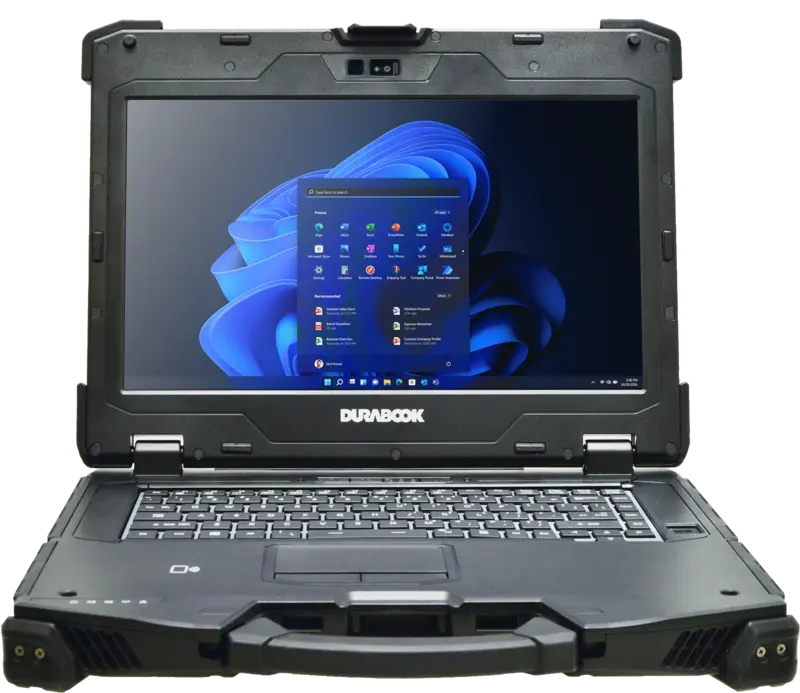
At first glance, Thunderbolt 4 sits in a completely ordinary USB-C port – and that is exactly what causes so much confusion when it comes to a purchase decision. Not every USB-C port is a Thunderbolt 4 port, and not every rugged notebook or tablet in the range has one. This article explains what Thunderbolt 4 actually delivers compared with USB-C and USB 3.2, when it pays off in field use, and when a simple USB-C connector is just as good. The second part compares this against the actual lineup: which Durabook, Getac, and Fieldbook models genuinely have Thunderbolt 4 built in according to their product page – and which do not.
What Thunderbolt 4 is – and how it differs from USB-C and USB 3.2
Thunderbolt 4 is a transmission standard specified by Intel that builds on the USB4 protocol and uses the same USB-C connector type as many plain USB ports. The decisive difference is not the connector, but the minimum requirements a port must meet to be allowed to call itself "Thunderbolt 4". While USB4 devices, according to the specification, may also be certified at 20 Gbit/s, Thunderbolt 4 makes the full data rate mandatory. A plain USB-C port, such as many rugged laptops offer purely for charging or mass storage, does not have to meet any of these requirements and can consequently be considerably slower.
Data rate: significantly more bandwidth than USB 3.2
Thunderbolt 4 transfers data at up to 40 Gbit/s bidirectionally. That is a multiple of what the USB 3 connectors common on rugged laptops and tablets in the range deliver – the Laptop Comparison Table lists, for the Durabook models, rows such as "USB 3 (Type-A)" and "USB 3 (Type-C)" as well as "USB 2.0 (Type-A)", and the Tablet Comparison Table additionally lists "USB 3.2 Gen 1 (Type-A)". These connectors are designed for a keyboard, mouse, USB sticks, or simple peripherals, but come nowhere near the bandwidth of Thunderbolt 4. In addition, the Thunderbolt 4 specification mandates a minimum data rate of 32 Gbit/s for forwarding PCI Express traffic – relevant when an external SSD or a dock needs to be connected directly to the computer's architecture instead of running through a slower USB controller.
Display connection via Thunderbolt 4
Thunderbolt 4 forwards DisplayPort signals directly over the USB-C connector. According to the specification, a Thunderbolt 4-certified computer must be able to drive at least two 4K displays or a single 8K display – over a single cable, without an additional graphics card or a separate video output. By comparison, the Laptop Comparison Table lists additional classic video outputs such as VGA and HDMI for the Durabook models, and a DisplayPort for individual models – these are separate, physically distinct connectors, not a function of the USB-C port.
Power delivery over the same connector
Thunderbolt 4 uses USB Power Delivery and makes it possible to power the notebook and connected peripherals over the same cable. In practice, this means a single cable to a dock can transfer data, drive displays, and charge the notebook at the same time. How much charging power a particular model in the range actually draws through its Thunderbolt 4 port is not spelled out in detail on the respective product pages – no reliable figure can be given here.
Daisy-chaining several devices
According to the specification, Thunderbolt 4 allows up to six devices to be daisy-chained to a single port, for example a dock that in turn passes through further Thunderbolt peripherals. A plain USB-C or USB 3 connector generally does not support this chain in the same way – here, each device must be connected directly or via a passive USB hub, which splits the usable bandwidth across all connected devices instead of providing it to each individually.
Same connector, different technology: the risk of confusion
The practical catch with Thunderbolt 4 is that the port cannot be told apart from an ordinary USB-C port from the outside. Both use the same connector type, often even side by side on the same device – for instance when a model has both a Thunderbolt 4 port and an additional USB 3 port in Type-C format. Anyone buying an external dock, a fast SSD, or a cable therefore cannot tell from the look of the port whether full Thunderbolt 4 bandwidth is available or only the much lower USB data rate. The only reliable source here is the technical specifications of the respective device – that is, the product page or the comparison table – not the appearance of the connector itself. On the Fieldbook RC300, for example, the product page lists, under "Connectors and sensors", alongside three USB 3.0 connectors, an additional "1 x Thunderbolt type C" – another example that USB and Thunderbolt connectors can sit side by side on the same device, with only the exact label revealing the difference.
Which rugged laptops in the range have Thunderbolt 4
The Laptop Comparison Table lists, for the four Durabook laptops S15, S14I, Z14I, and S15AB, a row "USB 3 (Type-C)" with one connector each – the table itself does not distinguish at this point between a plain USB-C port and a Thunderbolt 4 port. Only a look at the individual product pages shows which of the four Type-C connectors are actually Thunderbolt 4:
- Durabook S15: The product page names only Wi-Fi 6E and Bluetooth v5.3 under "Connectivity", without mentioning Thunderbolt – the USB-C connector from the comparison table is accordingly a plain USB 3 port.
- Durabook S14I: The product page explicitly lists "2x Thunderbolt 4" among its interfaces.
- Durabook Z14I: The product page names, under "Interfaces", "2x RJ45, 2x RS232, 2x Thunderbolt 4, HDMI and VGA" – again two Thunderbolt 4 connectors.
- Durabook S15AB: The product page states its connectors as "1x USB 3.1 Type-C, 2x USB 3.1 Type-A, 1x USB 2.0, 1x HDMI, 1x VGA" – with no mention of Thunderbolt. The Type-C port is accordingly a regular USB 3.1 connector.
Of the four current Durabook laptops, only the Durabook S14I and the Durabook Z14I therefore carry two Thunderbolt 4 connectors each, according to their product pages. The Durabook S15 and the Durabook S15AB, on the other hand, make do with regular USB connectors in Type-C format.
Which rugged tablets in the range have Thunderbolt 4
For the tablets, the starting point is more complex because the Tablet Comparison Table and the individual product pages do not fully match. The table has its own row "Thunderbolt 4 (USB-C)", which shows "–" for the R11L, R11, U11I, and R8 models and lists a connector only for the R10. A comment in the table's source code explains this gap itself: the row was added because Thunderbolt 4 is explicitly named in the import text for the R10, while for R11L, R11, U11I, and R8 it remained "not documented" in the table – so at this point the table does not necessarily reflect the full equipment level of every model.
A look at the individual product pages shows a more nuanced picture:
- Durabook R10: The product page names, under "Interfaces", "1x Thunderbolt 4 (Type-C)" as well as "1x USB 3.2 Gen 1 (Type-A)" – matching the comparison table, which lists a Thunderbolt 4 connector for the R10.
- Durabook R8: The product page names, under "Connectivity", "USB Type-C (support DP) and Thunderbolt 4" – even though the Thunderbolt row of the comparison table shows "–" for the R8.
- Durabook U11I: The product page names, among the connectors, "2x USB 3.2 Type A and 1x Thunderbolt 4 for ultra-fast data transfer" – here, too, this differs from the table row, which shows "–".
- Durabook R11: The product page describes only "the built-in USB 3.2 connector" (singular) – with no mention of Thunderbolt.
- Durabook R11L: The product page names "the two built-in USB 3.0 connectors" – likewise with no mention of Thunderbolt.
In practice, this means: anyone relying on Thunderbolt 4 for a tablet should not rely solely on the corresponding table row, but should also check the running text of the respective product page or ask directly. Thunderbolt 4 is reliably confirmed for all three models R10, R8, and U11I; for the R11 and R11L, on the other hand, no corresponding information is given.
Thunderbolt 4 at Getac and Fieldbook in the range
Outside the Durabook line as well, Thunderbolt 4 has by now become standard equipment on several models in the range. On the Getac X600, the product page names, among the connectors, specifically "1x Thunderbolt™ 4, 4x USB 3.2 Gen 2 Type-A, 1x HDMI 2.0, 1x DisplayPort" – a combination designed for connecting several displays and fast accessories to the same device. Further models with a Thunderbolt 4 connector according to their respective product page are the Getac B360 G3, Getac F110-EX, Getac F110 G7, Getac K120, Getac S410 G5, Getac S510 (partly optional there), Getac UX10, as well as the Getac UX10-EX and the Getac V110 G3. For other Getac models in the range, such as the Getac A140, Getac T800, Getac V120, or Getac X500, the respective product page gives no Thunderbolt information.
On the Fieldbook RC300, the product page names, under "Connectors and sensors", "1 x Thunderbolt type C" – without explicitly naming the generation as "Thunderbolt 4". For the remaining Fieldbook models, as well as for the Ruggon and Archos devices in the range, no Thunderbolt connector is documented on the respective product pages.
When Thunderbolt 4 really pays off in field use
External storage on the move
Anyone copying large amounts of data from an external SSD in the field – for example survey, scan, or image data – benefits directly from the higher bandwidth: a copy operation that takes several minutes over a plain USB 3 connector can run noticeably faster over Thunderbolt 4, provided that both the storage medium and the cable support the full data rate. For smaller files or occasional data exchange via a USB stick, on the other hand, the difference is barely noticeable.
Docking stations with a single cable
The second major advantage shows up at the workstation: a Thunderbolt 4 dock connects network, display(s), peripherals, and power supply to the notebook over a single cable. That is especially practical when switching between field and office use, if a rugged notebook such as the Durabook Z14I or S14I is docked and undocked regularly, without having to plug in separate cables for power, network, and monitor each time. Important here: the "docking connector" listed separately in the Laptop Comparison Table is, on the Durabook models, its own proprietary connector for the manufacturer's own docking stations – independent of whether the respective model additionally has a Thunderbolt 4 port or not.
Several displays at a mobile workstation
Anyone who wants to work with two monitors in the office or at a control desk can achieve this with a single cable via a Thunderbolt 4-capable device, since the specification provides for up to two 4K displays or one 8K display over the same connector. Without Thunderbolt 4, two separate video outputs are generally needed for two external displays, for example a combination of HDMI and VGA, which several Durabook models already have according to the Laptop Comparison Table – but each requiring its own cable instead of being bundled through one port.
When Thunderbolt 4 is unnecessary
Not every use case needs the extra bandwidth. Anyone who, as described in the Durabook R11L's product description, essentially connects "mouse, keyboard, USB sticks, and similar devices" benefits just as much from a regular USB 3 connector as from Thunderbolt 4 – the data volume and transfer speed of such peripherals lies far below what both standards can deliver anyway. Even with a single external display at moderate resolution, a classic HDMI or VGA output, which all four Durabook laptops have according to the Laptop Comparison Table, is often entirely sufficient. Thunderbolt 4 pays off above all where several functions – data, video, power, several peripheral devices – need to run over a single cable at the same time, or where genuinely large amounts of data need to move in a short time.
Limits of Thunderbolt 4: cable length, cost, and risk of confusion
Thunderbolt 4 also has practical limits. Passive cables that transfer the full data rate of 40 Gbit/s are, according to the specification, only intended for lengths of up to two meters; longer runs require active, electronically boosted cables. For mobile use at a vehicle workstation or a control desk, this is generally not critical, but it should be taken into account when planning a fixed docking spot. Certified Thunderbolt 4 cables and docks are also more elaborately made than plain USB-C cables, which shows up in the purchase price – no reliable prices can be given here, as they vary considerably by vendor and configuration. The third limit is the risk of confusion already described: because Thunderbolt 4 and plain USB-C use the same connector, it is impossible to tell, without checking the technical specifications of the respective device, whether a port supports the full bandwidth, display forwarding, and power delivery of Thunderbolt 4 or only a fraction of it.
Frequently asked questions
Is every USB-C connector also Thunderbolt 4?
No. Both use the same connector type, but only a connector that meets the Thunderbolt 4 specification – meaning, among other things, 40 Gbit/s data rate, forwarding of DisplayPort signals, and Power Delivery – is allowed to call itself Thunderbolt 4. Whether a particular model in the range has such a port is generally stated in the running text of the respective product page, but not always fully reflected in the comparison tables.
Which rugged laptops in the range have Thunderbolt 4?
According to their respective product pages, the Durabook S14I and the Durabook Z14I carry Thunderbolt 4, while the Durabook S15 and the Durabook S15AB do not – those have regular USB 3 connectors in Type-C format.
Which rugged tablets in the range have Thunderbolt 4?
According to their respective product pages, the Durabook R10, Durabook R8, and Durabook U11I carry Thunderbolt 4. For the Durabook R11 and Durabook R11L, no Thunderbolt connector is documented on the product page.
Can I also run regular USB-C devices on a Thunderbolt 4 port?
According to the specification, Thunderbolt 4 is fully backward compatible with USB-C and older Thunderbolt generations. A plain USB-C device can therefore be run on a Thunderbolt 4 port, but it only makes use of the lower data rate of its own standard.
Does Thunderbolt 4 replace the proprietary docking connector of the Durabook laptops?
No. The docking connector listed separately in the Laptop Comparison Table is its own manufacturer-specific connector for the respective docking station and is independent of whether a model additionally has Thunderbolt 4.
In Which Situations Thunderbolt 4 Brings an Advantage
Compared with USB-C and USB 3.2, Thunderbolt 4 brings a genuine advantage above all in three situations: quickly copying large amounts of data from external storage, docking into a single-cable dock with network, power, and display, and running several high-resolution monitors through a single connector. For simple peripherals such as a mouse, keyboard, or the occasional USB stick, however, it brings no noticeable added value. Within the range, according to their respective product pages, the laptops Durabook S14I and Durabook Z14I, as well as the tablets Durabook R10, Durabook R8, and Durabook U11I, carry a Thunderbolt 4 connector; the Durabook S15, Durabook S15AB, Durabook R11, and Durabook R11L do without it. A complete overview of the remaining connectors is provided by the Laptop Comparison Table and the Tablet Comparison Table.
If you have questions about which model brings the right connectivity for your specific use case – fast data transfer, docking, or several displays – the RobustBook team is happy to help you choose.