Anyone who uses a rugged laptop or a rugged tablet alternately outdoors and at a desk sooner or later faces the same question: is a simple HDMI cable enough for the external monitor, or is a docking station with a USB-C or Thunderbolt connector worth it? This article sorts through the docking types actually available in the RobustBook range, explains the difference between USB-C docks and Thunderbolt docks, shows how many external screens can be connected, what power delivery via the dock means – and covers the special case of rugged devices: vehicle-mounted docks and docking solutions with their own lock.
What docking types are there?
Within the accessory program for Durabook laptops and tablets, four fundamentally different ways of connecting a device to peripherals and monitors can be distinguished:
- Direct connectors on the device – HDMI, VGA, USB-A, USB-C or Thunderbolt 4, built into the housing depending on the model, without any additional accessory.
- USB docking station – a compact accessory that provides several USB devices and monitors at the same time via a single cable.
- Office docking station – a stationary docking station with its own power supply and a fixed connector to the device, designed for permanent use at an office workstation.
- Vehicle docking station – a mount designed for mobile use with a docking connector that also mechanically secures the device and, in some cases, locks it.
Which of these docking types is available for a given model varies considerably. A complete overview is provided by the Laptop Accessories Comparison Table for the Durabook laptops S15AB, S14I, and Z14I, as well as the Tablet Accessories Comparison Table for the Durabook tablets R11L, R11, and U11I. According to these tables, the USB 3.0 docking station is available for all three laptop models and all three tablet models named. The office docking station and the vehicle docking station, however, are listed for the laptops only for the S14I and the Z14I, not for the S15AB. For the tablets, an office dock and a vehicle dock are each available for R11L, R11, and U11I.
Docking connector as its own category
Besides the accessories, the central Laptop Comparison Table also lists a separate feature called "docking connector": for the Durabook S15 and the S14I it is marked as optional, on the Z14I it is fixed, and on the S15AB it is not provided at all. For the tablets, the Tablet Comparison Table shows a docking connector for R11L, R11, U11I, and R8, while the R10 has no docking connector in that row. The Durabook R11L is explicitly described on its product page as having an "integrated docking port".
USB-C docks compared to Thunderbolt docks
USB-C, at first, only describes the shape of the connector. Thunderbolt 4 is a protocol that runs over the same USB-C connector but can bundle additional functions, such as video output and data transfer, through a single port. Not every device with a USB-C port therefore automatically supports Thunderbolt as well – within the RobustBook range, this distinction can be traced clearly on the individual product pages.
According to their respective product pages, devices equipped with Thunderbolt 4 include, among others, the Durabook S14I (2x Thunderbolt 4), the Durabook Z14I (2x Thunderbolt 4, plus HDMI and VGA), the Durabook R10 (1x Thunderbolt 4 Type-C), the Durabook R8 (USB Type-C with DP support, plus Thunderbolt 4), and the Durabook U11I (1x Thunderbolt 4 alongside 2x USB 3.2 Type A). Several Getac models in the range also carry Thunderbolt 4: the Getac UX10 ("Thunderbolt™ 4 Type-C, USB 3.2, and docking connector as standard"), the Getac UX10 EX, and the Getac S410 G5, whose interface list includes, among others, 1x Thunderbolt™ 4 Type-C, 1x HDMI 2.0, and 1x docking connector.
A counterexample is the Durabook S15AB: its interface list names 1x USB 3.1 Type-C, 2x USB 3.1 Type-A, 1x USB 2.0, 1x HDMI, and 1x VGA – Thunderbolt is not mentioned for this model. The same is true of the Ruggon Vulcan 10A vehicle computer, whose interfaces include "USB 3.1 & USB-C (DP Alt Mode)", and of the Fieldbook P122 G2 with USB 3.0, USB Type-C, HDMI, and RS232 – here, too, no Thunderbolt is documented. USB-C, in other words, is not the same as Thunderbolt: a USB-C connector may, but does not have to, support Thunderbolt.
That USB-C docks and Thunderbolt use are also kept as separate accessory categories within the range is shown by the configuration of the Durabook S15: in the "Docking & Connectivity" section, the "Office Dock with AC Adapter (120W)", the "Durabook USB 3.0 Docking Station", and, separately, the "Durabook USB-C Docking Station" appear as independent options to choose from – three different docking solutions for one and the same device.
A note on the data: in the central Tablet Comparison Table, the row "Thunderbolt 4 (USB-C)" currently shows a connector only for the R10, even though the individual product pages of the R8 and U11I also mention Thunderbolt 4. For a complete comparison, it is therefore always worth checking the respective product page in addition to the comparison table.
When is a simple HDMI connector enough?
Not every use case needs a full dock. According to the Laptop Comparison Table, all four current Durabook laptop models – S15, S14I, Z14I, and S15AB – have an HDMI connector (Type-A). Anyone who only wants to connect a single external monitor, for example for a presentation or a simple second screen at a desk, already gets by with the built-in HDMI port on these models, without needing any additional accessories.
This applies in particular to models without a dedicated docking connector: according to the Laptop Comparison Table, the Durabook S15AB is the only one of the four models without a docking connector, but it offers HDMI, VGA, and several USB interfaces directly on the device. The Getac X500 also has its interfaces – 2x serial ports (RS232), 1x VGA, 1x HDMI, and 4x USB 3.2 Gen 1 – built directly into the housing, without the product page mentioning a docking connector or Thunderbolt for this model.
For use cases where, in addition to a monitor, network connectivity, several USB devices, or a serial interface need to be available permanently in the same place, a single HDMI connector is not enough – this is where office or USB docking stations come in, bundling these connectors together.
How many external screens can be connected?
The USB 3.0 Docking Station answers this question most concretely: according to the description in the Laptop Accessories Comparison Table and the Tablet Accessories Comparison Table, it can connect up to 6 USB devices such as a mouse, keyboard, and camera, plus up to 2 monitors at the same time – for both laptops and tablets.
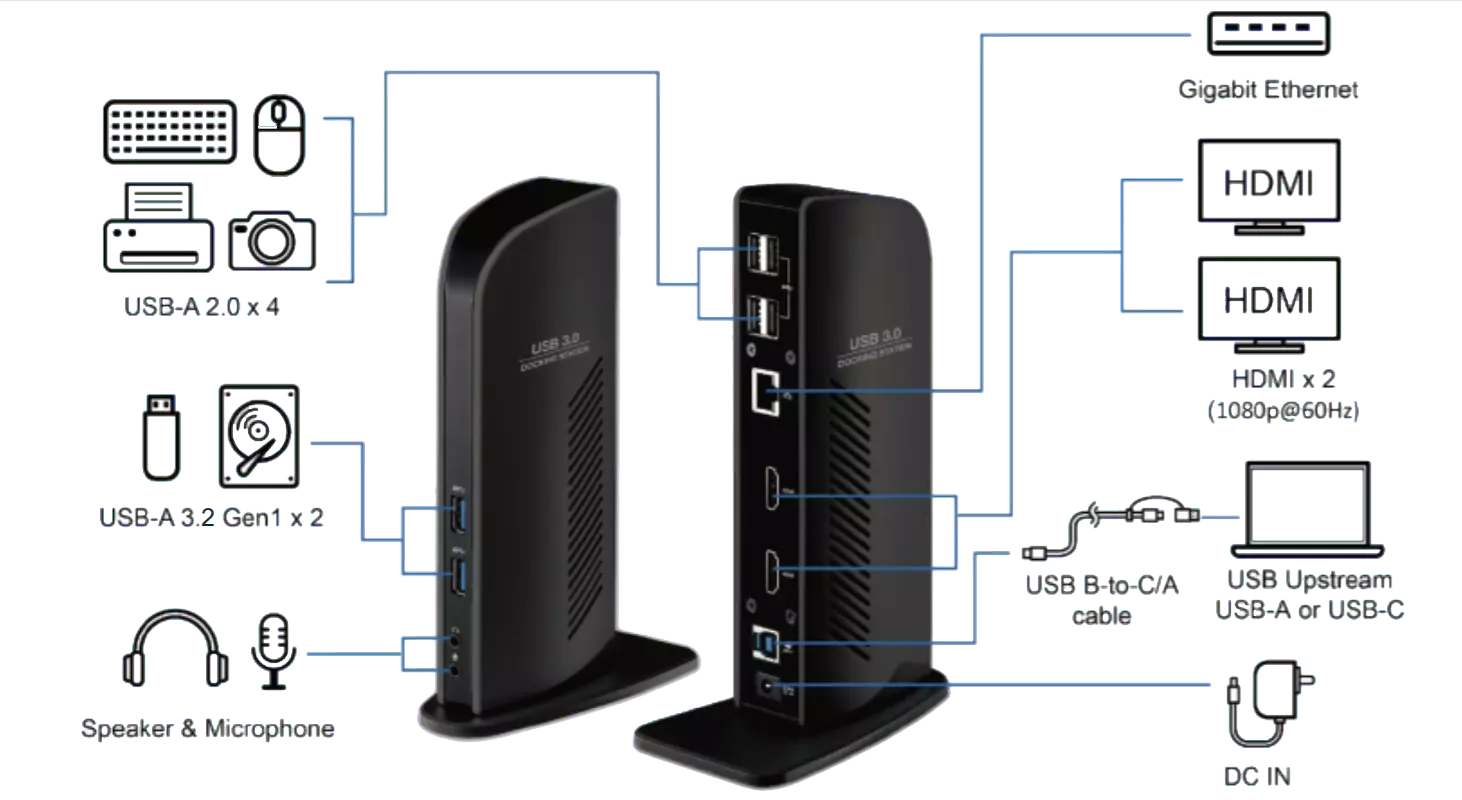
The office docking station for the S14I and Z14I goes even further with its video outputs: its documented connector list includes both a DP (DisplayPort) connector and a separate HDMI connector – each explicitly described as a "connector for an external monitor" – plus a VGA port for older devices or monitors. This gives the docking station several independent video outputs.
For the office docking station for the R11L, R11, and U11I tablets, the connector list is somewhat leaner: it includes an HDMI connector for an external monitor, and for the U11I additionally a VGA connector for older devices or monitors. The vehicle docking station for the tablets likewise offers an HDMI connector for an external monitor, supplemented on the U11I by an additional VGA connector.
More than one screen can also be possible directly on the device, without a separate dock: the Getac X600 lists both 1x HDMI 2.0 and 1x DisplayPort directly on the housing in its interface list, independent of any docking station.
What does power delivery via the dock mean?
A docking station can play two different roles when it comes to power: it may itself need to be supplied with power to run its own connectors and components, or it may additionally supply the docked device with power. For the office docking station of the S14I and Z14I, the connector list documents a "DC input jack" described as "power supply for the individual components", supplemented by its own power LED that shows whether the docking station is currently being supplied with power. The same principle – a DC input jack for powering the components – is also found in the connector list of the vehicle docking station for the R11L, R11, and U11I tablets, as well as in the connector list of the office docking station for the same tablet models.
How powerful the associated power supply is can be stated concretely using the example of the Durabook S15: its configurator lists an "Office Dock with AC Adapter (120W)" as an accessory option – the office docking station is offered there in combination with a 120-watt power supply.
For the Getac S410 G5, the optional, configurable I/O variants include, among others, a version with "PowerShare USB 3.2 Gen 1 Type-A" as a named connector option. The accessory program for this model also includes a multi-bay dual-slot charger, an eight-battery multi-bay charger, and a DC-DC vehicle adapter (120 W, 11–32 VDC) for power from the vehicle's electrical system. These details come directly from the accessory list on the Getac S410 G5 product page; the page does not give further technical details about the PowerShare function.
Special case for rugged devices: vehicle-mounted docks and docking solutions with their own lock
In field use, a second aspect is added to the pure connectivity question: the device must stay securely fixed while driving and must not be easily removable. This special case is documented most extensively for the vehicle docking station of the Durabook R11L, R11, and U11I tablets. Alongside the data connectors, its connector list describes its own mechanical lock: a "locking rod (with key slot)", about which the Tablet Accessories Comparison Table remarks literally that the tablet "can be left safely in the vehicle without worrying about theft". The mount is further supplemented by mounting holes for a VESA mount, an alignment opening so the tablet is inserted in the correct position, and the actual docking connector.
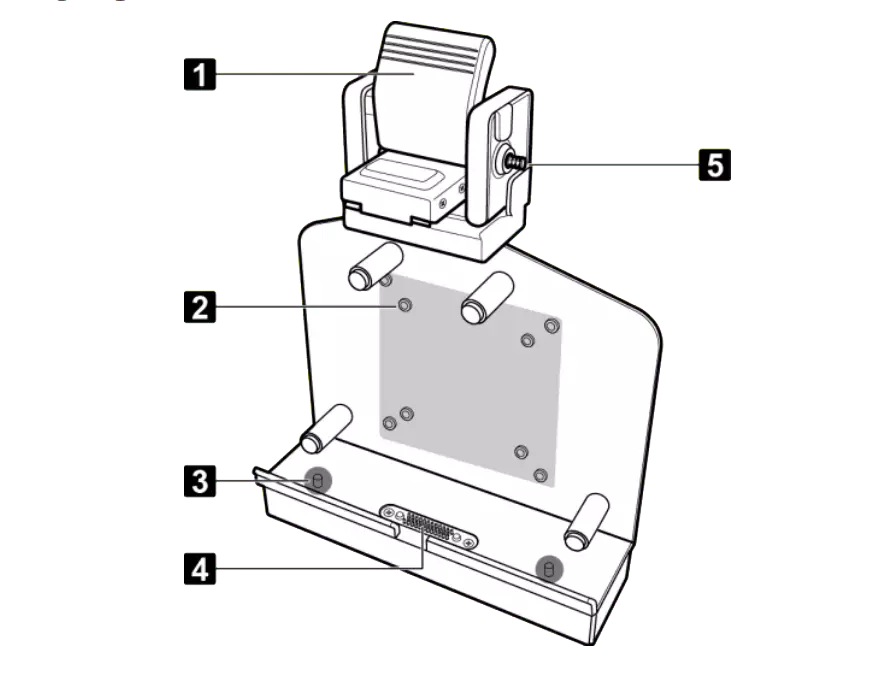
According to the Tablet Accessories Comparison Table, this vehicle docking station has the following data connectors: an Ethernet connector for a 1 Gbit/s connection, 2x USB3.0 connectors, a WWAN antenna connector, 2x USB2.0 connectors, an HDMI connector for an external monitor, a GPS antenna connector, an RS-232 interface, plus the already mentioned DC input jack for power supply. On the U11I, a slot for a Kensington lock, a VGA connector, an audio output, a microphone input, an LTE antenna connector, a sliding lock, and four mounting holes for VESA mounting are added. Anyone who wants to know more about the RS-232 serial interface found on several of these docks can find background information in the article The RS232 Interface: What Is It?.
The stationary office docking station for the S14I and Z14I likewise has its own mechanical lock, although without any vehicle connection: its connector list names both a "lock/unlock switch" – with a note that the device must be switched off while it is being removed – and a separate lock bolt.
For the vehicle docking station for laptops, the data available is thinner: according to the Laptop Accessories Comparison Table, a vehicle docking station is available for the S14I and the Z14I (each marked with a checkmark in the table), but the corresponding content section for this accessory has not yet been filled in on the page. Specific connector or locking details for the laptop variant therefore cannot be confirmed at this point – unlike the thoroughly documented tablet variant.
Among manufacturers without an integrated docking port, the vehicle connection is sometimes found directly within the device's own accessory program: the Getac S410 G5 lists in its accessory list both a "vehicle docking station" and a "vehicle cradle" as well as an "office docking station" – in addition to a separate "DS100 USB-C docking station". Here, too, the connector list for these specific vehicle accessories remains open on the product page; it is only stated that they belong to the model's accessory program.
Frequently asked questions
What is the difference between a USB docking station and an office docking station?
The USB 3.0 Docking Station connects a laptop or tablet to up to 6 USB devices and up to 2 monitors via a single cable. The office docking station for the S14I and Z14I goes beyond that: it additionally brings an Ethernet connector, an RS-232 interface, audio input and output, and a fixed docking connector with its own lock.
Is HDMI enough for a second monitor on a laptop?
For a single additional monitor, the built-in HDMI connector, which all four current Durabook laptop models have according to the Laptop Comparison Table, is enough. If several monitors, USB devices, and further interfaces are to run at the same time through a single connector, a docking station is the more suitable choice.
Which RobustBook devices have Thunderbolt 4?
According to their respective product pages, among others the Durabook S14I, the Durabook Z14I, the Durabook R10, the Durabook R8, the Durabook U11I, and several Getac models such as the Getac UX10, the Getac UX10 EX, and the Getac S410 G5.
Do vehicle docks lock automatically?
On the vehicle docking station of the Durabook R11L, R11, and U11I tablets, a locking rod with a key slot secures the device against theft; on the U11I, a sliding lock is added as well. For the corresponding vehicle docking station for laptops, no technical detail about the lock is currently documented on the accessories page.
Which Docking Solution Fits Which Use Scenario
The right docking type depends on the actual use scenario: for a single additional monitor, the built-in HDMI connector is enough on all current Durabook laptops. Anyone who regularly switches between mobile use and a fixed workstation and wants to connect several USB devices as well as up to two monitors via a single cable is well served by the USB 3.0 Docking Station. For a permanent office workstation with additional network, audio, and serial connectivity, the office docking station of the S14I and Z14I offers the more extensive solution – including its own power supply and mechanical lock. For mobile use in a vehicle, finally, the vehicle docking station of the Durabook tablets shows how a docking solution can, in addition to data transfer, also take care of securing the device against theft. Whether USB-C or Thunderbolt 4 is available depends on the particular device model – a look at the Laptop Comparison Table or the Tablet Comparison Table shows in advance which interfaces a model actually has.
If you have questions about the right docking station for your area of use, the RobustBook team is happy to help you choose the right accessories.