The term "workstation" comes from the desktop world: a workplace computer with significantly more computing power, graphics performance, and memory than an ordinary office PC, designed for compute-intensive applications such as CAD, 3D design, or data analysis. A mobile workstation carries this performance promise over into a portable device. The term itself is not protected and is not used consistently: some manufacturers already apply it to a powerful notebook, while others reserve it exclusively for devices with a dedicated graphics card certified for professional applications. This article classifies the term, distinguishes it from an ordinary notebook and from a desktop workstation, and uses devices from the RobustBook range to show which technical features define a mobile workstation in practice.
Mobile Workstation: A First Classification
A mobile workstation is a portable computer that exceeds a standard notebook in key performance characteristics: processor performance, but above all graphics performance, memory, and storage. The goal is to run applications that traditionally require a desktop computer, such as CAD software, 3D visualization, or compute-intensive data analysis, smoothly while on the move or directly at the point of use. Rugged devices for field use add a further dimension that plays no role for a desktop workstation: the device must fit this concentrated computing power into a housing that withstands drops, dust, moisture, and temperature fluctuations, without losing connectivity options or usability in the field.
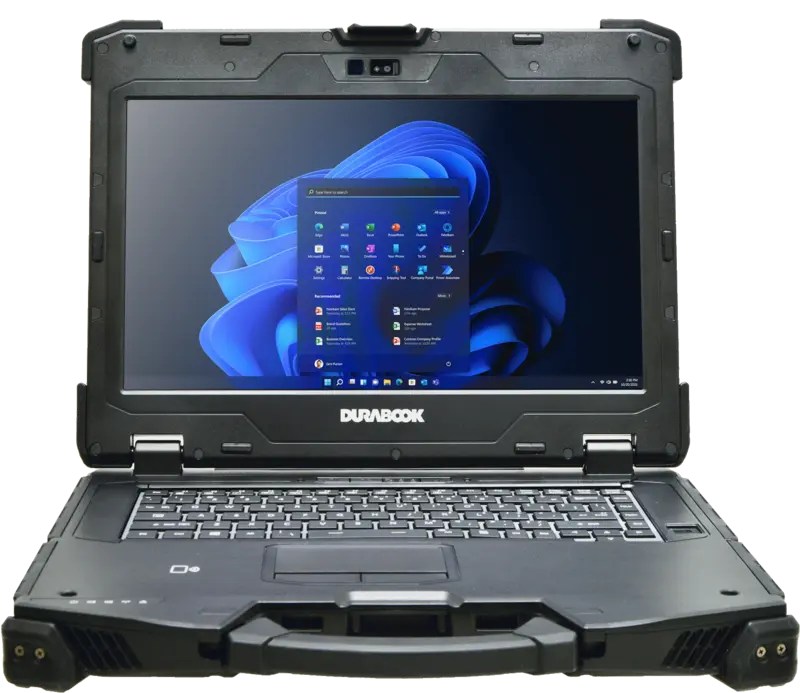
In the RobustBook range, the Durabook Z14I is the model whose manufacturer description explicitly calls it an "ultra-rugged mobile workstation", equipped with Intel® Core™ Ultra 7 processor technology and a dedicated NVIDIA RTX 3500 Ada graphics card, developed for compute-intensive tasks in extreme environments. The following sections go into detail on the features that define this device class.
Processor and Graphics Card: The Most Important Difference from an Ordinary Notebook
Processor and NPU
An ordinary rugged notebook and a mobile workstation can use the same processor family. The real difference rarely lies in the processor alone, but above all in the graphics unit and the ability to cool it continuously under load. The Durabook Z14I, in the High-End-Graphics edition described here, is equipped with an Intel® Core™ Ultra 7 155U (12 MB cache, up to 4.8 GHz, 12 cores, 14 threads), which also brings an integrated Intel® AI Boost NPU for AI-assisted tasks. According to the configuration list in the configurator, an Intel® Core™ Ultra 7 165U with up to 4.9 GHz is also available as an option.
Graphics Card: Dedicated Instead of Integrated
The core difference between a mobile workstation and an ordinary notebook lies in the graphics card. An ordinary notebook makes do with the graphics unit integrated into the processor, sufficient for office applications, map display, or form entry, but not for compute-intensive 3D rendering. The Z14I in the High-End-Graphics edition, by contrast, is equipped with a dedicated NVIDIA RTX 3500 Ada with 12 GB of DDR6 video memory, according to the manufacturer description, suitable for complex 3D visualizations, CAD applications, and AI-assisted data analysis.
By comparison: the standard models Durabook S14I and Durabook S15 also offer an NVIDIA graphics option according to their respective configuration lists, but as an optional external upgrade ("discrete graphics card (VGA) with 120W power supply – NVIDIA RTX A500") rather than as a graphics solution integrated and dedicated within the housing. This illustrates the difference between a rugged everyday notebook with a graphics upgrade option and a mobile workstation that comes with dedicated graphics performance from the outset. The Getac X600 in the range also offers a workstation-capable graphics card as an option: according to the product page, an NVIDIA® Quadro® RTX3000 can optionally be added to the integrated Intel® UHD Graphics, a GPU series specifically designed for professional CAD and visualization software.
Memory and Storage
Compute-intensive applications such as CAD models, large GIS datasets, or several analysis tools open at the same time require more memory than a simple notebook typically provides. According to the manufacturer description, the Durabook Z14I includes 32 GB of DDR5 RAM as part of the configuration described here; according to the configuration list on the product page, the memory can additionally be expanded to up to 64 GB. For storage, the manufacturer description names a 1 TB PCIe SSD; according to the configuration list, configurations of up to 2 TB PCIe SSD or two combined SSDs (for example two times 1 TB) are available.
The range is even more pronounced with the Getac X600: according to the product page, it offers memory from 16 GB up to 128 GB of DDR4 as well as storage capacity of up to three replaceable SSDs totaling up to 6 TB, a figure that reaches the order of magnitude of some desktop workstations, housed in a portable, rugged enclosure.
A note for context: alongside the laptop variant described here, the configurator on the Z14I product page also lists a "Z14I (G3) Portable Server" variant. This is not a mobile workstation in the sense described here, but a separately available expansion server box with up to four factory-installed SSDs (either 1 TB or 2 TB per drive) for storage and RAID applications in the field. Anyone specifically looking for a mobile workstation for compute and graphics load should not confuse this storage variant with the High-End-Graphics edition described here.
Display, Connectivity, and Access Protection
Display
Anyone assessing CAD models, construction plans, or sensor data in the field needs a display that stays readable even in direct sunlight. According to the manufacturer description, the Durabook Z14I is fitted with a 14" Full HD touchscreen display with 1200 nits of brightness, which according to the description remains well readable even in direct sunlight. The Comparison Table Laptops confirms a sunlight-readable display with 1000 nits as a standard feature for the Z14I, while this is only optionally available for the S15, S14I, and S15AB models according to the same table.
Ports
A mobile workstation must be able to connect to a wide variety of peripherals in the field, from measuring instruments to serial sensors to external monitors. According to the manufacturer description, the Z14I features 2x RJ45, 2x RS232, 2x Thunderbolt 4, HDMI, and VGA. The Comparison Table Laptops confirms two serial RS232 ports for the Z14I compared to one each for the S15 and S14I, as well as a standard docking connector that the other Durabook models only offer as an option according to the table. An overview of which other rugged laptops in the range come with a serial interface is provided on the page RS232 Built In: Laptop with Serial Interface Compared.
Access Protection and Expansion
For professional use involving sensitive data, the Z14I manufacturer description additionally lists a Windows Hello IR webcam, a smart card reader, and an ExpressCard 54 slot. The Comparison Table Laptops confirms the standard smart card reader as well as the PCMCIA Type II or ExpressCard 54 slot for the Z14I, while both features are only optionally available for the S15 and S14I according to the table. According to the configuration list on the product page, the Z14I can additionally be extended with a PCI Express 2.0 expansion module with two slots.
Certifications: Rugged and Mobile at the Same Time
What additionally distinguishes a mobile workstation from a desktop workstation are the ruggedness certifications required for field use, which play no role in a server room or office. According to the Comparison Table Laptops, the Z14I is tested to MIL-STD-810H, including against drops, shocks, vibration, rain, dust, high altitude, frost/dew, high and low temperatures, temperature shock, and humidity. According to the same table, the Z14I withstands drops from up to 180 cm, the highest value among the four Durabook models compared there. Also according to the table, the Z14I has sealed port covers, is protected against humidity from 5% to 95%, and is designed for an operating temperature range of −20 °C to 60 °C.
For dust and water protection class (IP rating), the comparison table lists IP65 for the Z14I, complete protection against contact and dust combined with protection against water jets from any angle. A detailed explanation of the IP classification is provided in the article The Various IP Protection Classes. The Getac X600, too, is certified according to its own product page to IP66 as well as MIL-STD-810H and MIL-STD-461G, and according to its specifications withstands drops from up to 0.9 meters.
Mobile Workstation Compared to a Desktop Workstation
A desktop workstation is tied to the mains power supply, can be cooled without limit, and can be equipped with multiple graphics cards, a large amount of memory, and several internal drives without having to consider weight or battery life. A mobile workstation, by contrast, must make trade-offs between computing power, cooling, battery life, and weight within a portable, rugged housing. This is reflected, among other things, in weight: according to the Comparison Table Laptops, the Z14I weighs 3.6 kg, significantly more than the S14I at 2.3 kg, but a figure attributable to the built-in dedicated graphics card, the additional cooling, and the rugged construction. The difference from a desktop workstation is also apparent in power supply: according to the manufacturer description, the Z14I requires a powerful 240 W power supply to keep the dedicated graphics card running under full load.
The Getac X600 shows how close a mobile workstation can come to a desktop workstation: according to the product page, it offers 11th-generation Intel Core processors (i5/i7/i9), up to 128 GB of DDR4 memory, up to 6 TB of SSD storage across three replaceable drives, and optionally an NVIDIA Quadro RTX3000, figures more typically found in stationary workstations than in notebooks. Even so, according to the product page, the device remains usable on the move and is certified to IP66 as well as MIL-STD-810H/461G. The decisive difference from a desktop workstation remains, however: computing power is tied to the mobile device's built-in cooling system and battery or power-supply capacity, and unlike a desktop tower, it cannot be increased at will through additional internal expansion cards.
When Is the Premium for a Mobile Workstation Worth It, and When Isn't It?
A dedicated graphics card, more memory, additional ports, and further certifications generally mean a higher procurement cost compared to a simple rugged notebook. Whether this premium is worthwhile depends on the actual workload running on the device, not on whether "more performance" seems desirable in general.
The premium is generally worthwhile if graphics- or compute-intensive software is actually running in the field: CAD design and review directly on the construction site, 3D visualization of plants and machinery, GIS evaluation of large geodata sets, or AI-assisted data analysis on site. Such tasks are typically found in the industries also described on the pages Construction Site Tablets and Construction Site Laptops and Industry Tablets and Laptops, anywhere planning or evaluation work takes place directly at the point of use, rather than only after returning to a stationary computer in the office. Even when several compute-intensive applications must be open at the same time or large files are processed locally, more memory and a dedicated graphics card pay off, because the application would otherwise noticeably stutter or calculations would take disproportionately long.
By contrast, the premium is generally not worthwhile if the device is used mainly for form entry, documentation, communication, map display, or office applications. For these tasks, the graphics unit integrated into the processor of a rugged standard notebook such as the Durabook S14I or S15 is sufficient; the additional computing and graphics performance of a mobile workstation remains unused, while at the same time more weight has to be carried and a shorter battery life under load has to be accepted. Anyone unsure which configuration suits their own application will find a direct comparison of the specifications between the models in the Comparison Table Laptops.
What Sets a Mobile Workstation Apart From a Notebook and a Desktop
A mobile workstation differs from an ordinary rugged notebook primarily through a dedicated, professional graphics card instead of an integrated graphics unit, through more memory and storage, and through additional ports and security features such as a smart card reader and ExpressCard slot. It differs from a desktop workstation through its dependence on battery life, housing cooling, and power-supply capacity, but in return it brings certifications such as IP65 and MIL-STD-810H, which are necessary for field use but play no role for a stationary workstation in an office. In the RobustBook range, this role is filled primarily by the Durabook Z14I in the High-End-Graphics edition with a dedicated NVIDIA RTX 3500 Ada graphics card, complemented by the Getac X600 with an optionally available NVIDIA Quadro RTX3000 and a significantly higher maximum memory and storage capacity. A complete comparison of all specifications is provided in the Comparison Table Laptops.
If you have questions about whether a standard notebook is sufficient for your application or a mobile workstation makes sense, the RobustBook team is happy to help you select the right model.