CAD software, whether for design, construction planning, or technical drawing, places different demands on a mobile device than office applications or pure data-entry tasks. Anyone who wants to edit CAD models, rather than only view them, outdoors on the construction site, at a customer's site, or in the workshop needs a notebook whose processor, memory, graphics unit, storage, and display are designed for this load. This article explains which components make the difference, when certified professional graphics tip the scales over standard graphics, and which devices from the RobustBook range meet these requirements.
Why CAD Places Different Demands Than Office Applications
CAD programs calculate and render three-dimensional models in real time: surfaces, assemblies, section views, renderings. Every rotation, every zoom, and every change to an assembly triggers new calculations that the processor and graphics unit must handle together. While an office notebook manages with an integrated graphics unit and little memory, the same components quickly reach their limits with larger CAD assemblies: the display stutters, rotations lag, and renderings take noticeably longer. That is why it is worth looking at each individual component before purchase, not just the processor.
Processor: The Basis for Calculation and Regeneration
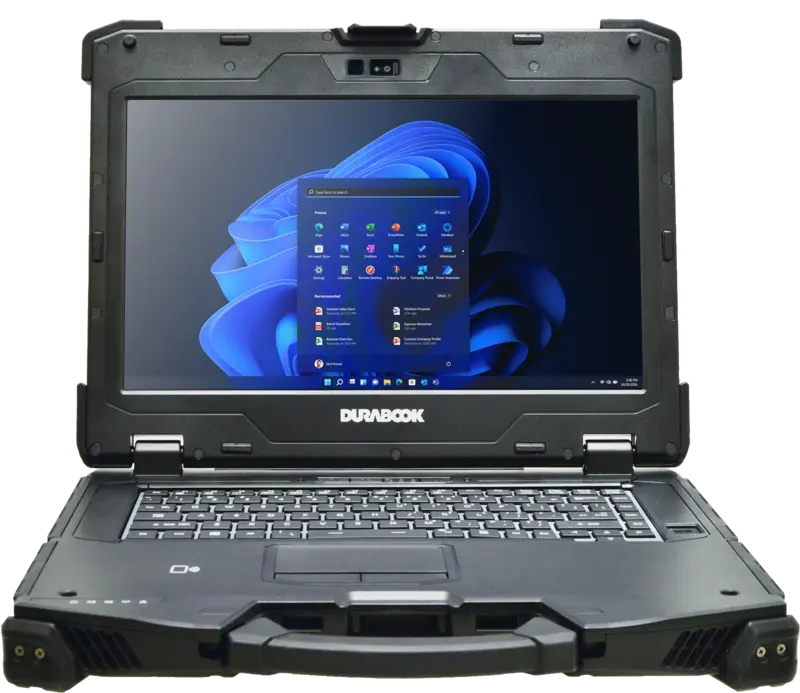
In CAD applications, the processor is mainly responsible for geometric calculation, the regeneration of assemblies, and, increasingly in modern notebooks, AI-assisted additional functions via an integrated NPU. In the RobustBook range, this range is well illustrated by the Durabook models: the Durabook S14I comes in its base configuration with an Intel® Core™ Ultra 5 125U and can be upgraded to an Intel® Core™ Ultra 7 155U or Ultra 7 165U, each with an integrated Intel® AI Boost NPU. The Durabook Z14I, in the High-End-Graphics version, is equipped with an Intel® Core™ Ultra 7 155U (12 MB cache, up to 4.8 GHz, 12 cores, 14 threads, including Intel® AI Boost NPU). The Durabook S15 relies in its standard configuration on an Intel® Core™ i5-1235U (1.3 GHz up to 4.4 GHz), optionally an Intel® Core™ i7-1255U. Getac devices also span up to the current Core generation: the Getac X600 is available with 11th-generation Intel® Core™ i5, i7, or i9 processors.
For simpler CAD tasks, such as 2D drawings or reviewing smaller assemblies, a current Core i5 or Core Ultra 5 processor is usually already sufficient. Anyone who regularly works with large assemblies or renders frequently benefits from a Core i7 or Core Ultra 7 processor with more cores and a higher clock speed.
Memory: How Much RAM CAD Models Really Need
During editing, CAD software keeps large parts of a model in memory. The larger the assembly, the more RAM is used. According to the Comparison Table Laptops, the Durabook S15 offers 8 to 32 GB of 4800 MHz DDR5 RAM, while the S14I and Z14I each offer 8 to 64 GB of 3200 MHz DDR4 RAM. The individual product pages show this in finer detail: the Durabook S14I starts with 16 GB of RAM and can be upgraded to 32 GB or 64 GB, and the Durabook S15 likewise starts with 16 GB in the standard-plus configuration with upgrade options to 32 GB or 64 GB. The Z14I in the High-End-Graphics version comes directly with 32 GB of DDR5 RAM. For the Getac X600, the range extends from 16 GB up to 128 GB of DDR4 RAM, and for the Getac S410 G5 from 8 GB DDR5 up to an optional 64 GB DDR5.
For smaller to medium-sized CAD assemblies, 16 GB of RAM is often a practical starting point; larger assemblies and applications opened in parallel benefit from 32 GB or more. Anyone who regularly works with very large assemblies, point clouds, or several models open at once will find the highest documented RAM ceiling in the RobustBook range with the Getac X600.
Graphics Unit: Standard Graphics or Certified Professional Graphics?
In CAD applications, the graphics unit is the component that most clearly determines smooth rendering. In principle, two paths are available: standard graphics integrated into the processor, or a dedicated, additional graphics card.
When Standard Graphics Are Enough
For 2D drawings, smaller 3D models without elaborate renderings, or simply viewing and reviewing CAD data, the integrated graphics unit of a current processor is sufficient in many cases. The Durabook S15AB, for example, is listed in the Comparison Table Laptops without a dedicated graphics card upgrade and is therefore best suited to applications that do not require dedicated graphics performance.
When a Dedicated Graphics Card Makes the Difference
As soon as larger assemblies, complex renderings, or smooth 3D rotation are required, the need for dedicated graphics performance rises significantly. According to the Comparison Table Laptops, the Durabook S15, S14I, and Z14I models optionally offer an NVIDIA GTX 1050 as a dedicated graphics card. The individual product pages list further dedicated graphics options beyond that: both the Durabook S15 and the Durabook S14I can be equipped with a discrete NVIDIA RTX A500 including a 120 W power supply, for which the manufacturer recommends an upgrade to at least 32 GB of RAM and at least 512 GB of SSD storage. The Durabook Z14I, in the High-End-Graphics version, is equipped with a dedicated NVIDIA RTX 3500 Ada with 12 GB of DDR6 video memory. Comparable options are also found at Getac: the Getac X600 optionally offers an NVIDIA Quadro RTX3000, otherwise Intel® UHD Graphics; the Getac S510 optionally offers an NVIDIA GeForce GTX 1650 with 4 GB as a separate graphics controller, and the Getac S410 G5 optionally an NVIDIA GeForce GTX 1650 with 4 GB.
This list also shows the difference between two categories of graphics cards that are classified differently in CAD environments: NVIDIA GeForce and GTX models are consumer graphics cards designed primarily for games and general 3D rendering. NVIDIA RTX A and RTX Ada generation models, as well as the Quadro series, on the other hand, belong to NVIDIA's professional graphics card line, which is specifically developed for design and visualization software and in which drivers and hardware are tuned for professional applications. For demanding CAD work with large assemblies, precise rendering of edges and surfaces, or elaborate renderings, one of the professional graphics options, such as the NVIDIA RTX A500, the NVIDIA RTX 3500 Ada, or the NVIDIA Quadro RTX3000, is therefore the more resilient choice compared to a consumer graphics card such as the GTX 1050 or GTX 1650.
Storage: Capacity and Speed for CAD Files
CAD projects often consist of many individual part and assembly files, supplemented by renderings, point clouds, or survey data. A fast SSD noticeably shortens loading times when opening and saving large models compared to a conventional hard drive. PCIe SSD storage is standard in the RobustBook range: the Durabook S15 starts with a 256 GB PCIe SSD and can be upgraded up to 2 TB or a combination of two SSDs, and the Durabook S14I likewise has a 256 GB PCIe SSD base with an upgrade option up to 2 TB or dual SSD. The Durabook Z14I, in the High-End-Graphics version, is equipped with a 1 TB PCIe SSD. According to the manufacturer description, the Getac X600 supports up to three user-replaceable SSDs with a total capacity of up to 6 TB.
For mobile CAD use, besides raw capacity, the ability to swap or exchange storage is also relevant: a quick-release storage bay, as found on the Durabook Z14I and S14I, makes it possible to physically transport or exchange project data even without a full data transfer.
Screen Size, Resolution, and Color Rendering
For working on CAD models, what matters besides the screen size itself is above all how many details are visible at once and how well fine lines and surfaces can be distinguished. According to the Comparison Table Laptops, the display size of the Durabook models is 15.6 inches (S15, S15AB) or 14.0 inches (S14I, Z14I), with all four models offering Full HD resolution of 1920 x 1080 pixels. On the product page, the Z14I additionally lists a 14-inch FHD touchscreen with 1200 nits as sunlight-capable equipment, while the S14I optionally offers a 14-inch sunlight-readable Full HD display with or without touchscreen, also with 1200 nits. For the S15, a 15-inch sunlight-readable Full HD display with 1000 nits is listed as a display option, while the base configuration offers a 15-inch FHD standard display with 400 nits.
For Getac devices, display size goes up to 15.6 inches: the Getac X600 offers a 15.6-inch Full HD display with 1,000 nits of LumiBond technology, and the Getac X500 a 15.6-inch QuadraClear display with 800 nits of brightness. These high nits values are relevant for pure readability outdoors; for detailed CAD work, the Full HD resolution present on all the devices mentioned also matters, keeping fine lines and dimensioning readable. A larger display area, as with the 15.6-inch format, makes it easier to work with several open windows or dimension bars than with a 14-inch display.
Regarding color rendering itself, such as color space coverage or calibration, no information is available for the models mentioned in the reviewed source files; no substantiated statement can therefore be made at this point.
Ports for External Displays and Peripherals
Anyone who wants to continue working on a larger external monitor in the office or at a customer's site depends on the available video outputs. According to the Comparison Table Laptops, all four Durabook models (S15, S14I, Z14I, S15AB) have a VGA port and an HDMI port (type A), with the S14I additionally having a DisplayPort. The product pages add more modern interfaces: the Durabook Z14I, in the High-End-Graphics version, is equipped with 2x Thunderbolt 4, HDMI, and VGA, and the Durabook S14I with 2x Thunderbolt 4 and 1x HDMI 2.1. According to the comparison table, a docking connector is standard on the Z14I and optional on the S15 and S14I; in addition, the Durabook configurator offers a USB-C docking station as an accessory for the S15 and S14I.
Modern video outputs are also present on Getac devices: the Getac X600 has 1x Thunderbolt 4, 1x HDMI 2.0, and 1x DisplayPort, the Getac S410 G5 has 1x Thunderbolt 4 Type-C and 1x HDMI 2.0 as well as a docking connector, and the Getac S510 has at least 1x Thunderbolt 4 Type-C, optionally a second one. Thunderbolt 4 allows the connection of one or more external displays through a single port. It also allows the simultaneous connection of docks, external drives, or network adapters via the same interface.
Choosing a CAD Notebook: Which Model for Which Use Case
From the reviewed manufacturer specifications, roughly three tiers can be derived for CAD practice:
- Light CAD tasks (2D, smaller assemblies, pure review): A model with an integrated graphics unit and 16 GB of RAM, such as the Durabook S14I or S15 in the standard configuration with an Intel® Core™ Ultra 5 125U or Intel® Core™ i5-1235U.
- Medium CAD load (larger assemblies, more frequent 3D rotation): A model with dedicated consumer or entry-level professional graphics and 32 GB of RAM, such as the Durabook S15 or S14I with an optional NVIDIA RTX A500.
- High CAD load (large assemblies, elaborate renderings): A model with dedicated professional graphics in the upper performance class and a large amount of memory, such as the Durabook Z14I with NVIDIA RTX 3500 Ada and 32 GB of DDR5 RAM, or the Getac X600 with an optional NVIDIA Quadro RTX3000 and up to 128 GB of RAM.
A complete overview of all technical data for the Durabook models in direct comparison, processor, memory, storage, display, interfaces, and protection class, is provided by the Comparison Table Laptops. The individual product pages Durabook S14I and Durabook Z14I additionally show the configurable options up to the professional graphics card.
Frequently Asked Questions
Is a Notebook with Integrated Graphics Enough for CAD?
For 2D drawings, smaller assemblies, and simply viewing CAD data, an integrated graphics unit can be sufficient. As soon as larger assemblies, elaborate renderings, or smooth 3D rotation are required, a dedicated graphics card is the more resilient choice.
What Distinguishes Professional Graphics from Standard Graphics?
Professional graphics models such as the NVIDIA RTX A series, the RTX Ada generation, or the Quadro series are specifically designed for design and visualization software, while consumer models such as GeForce GTX are developed primarily for games and general 3D rendering. Both categories are available as options in the RobustBook range, such as the NVIDIA RTX A500 on the Durabook S14I and S15 and the NVIDIA RTX 3500 Ada on the Durabook Z14I, compared to the optional NVIDIA GTX 1050 according to the Comparison Table Laptops.
How Much RAM Does a CAD Notebook Need at Minimum?
For smaller assemblies, 16 GB is a practical starting point, as offered by the Durabook S14I and S15 in their standard configuration. Larger assemblies benefit from 32 GB or more, up to 128 GB on the Getac X600.
Which RobustBook Model Is Best Suited for Demanding CAD Projects?
According to the reviewed manufacturer specifications, the Durabook Z14I in the High-End-Graphics version with NVIDIA RTX 3500 Ada, 32 GB of DDR5 RAM, and a 1 TB PCIe SSD offers the highest documented CAD configuration in the Durabook range; for even more memory, the Getac X600 is additionally available with up to 128 GB of RAM and an optional NVIDIA Quadro RTX3000.
What Equipment CAD Work in the Field Actually Needs
CAD places higher demands on a mobile device than pure office applications: especially regarding the graphics unit and memory, but also storage, display, and ports for external screens. For light CAD tasks, integrated standard graphics with 16 GB of RAM, as offered by the Durabook S14I and S15 in their base configuration, are often sufficient. For larger assemblies and elaborate renderings, it is worth reaching for certified professional graphics such as the NVIDIA RTX A500, the NVIDIA RTX 3500 Ada, or the NVIDIA Quadro RTX3000, combined with more memory and a fast PCIe SSD. Which tier fits in an individual case depends on the size of the assemblies being edited and the frequency of renderings. A complete technical overview is provided by the Comparison Table Laptops.
If you have questions about the right CAD configuration for your application, the RobustBook team is happy to help you select a suitable model.