There are four different types of hard drives.
- The HDD, which stands for "hard disk drive", is probably one of the best-known types of drive.
- An SSHD, which stands for "solid-state hybrid drive", is rarely used because the performance gain compared to an HDD is not very noticeable.
- An SSD, which stands for "solid state disk", is a very well-known drive that is often used in notebooks.
- The M.2 SSD, which stands for "solid-state drive", is a newer SSD technology with increased read and write speeds.
What Is an HDD Drive?
An HDD works similarly to a floppy disk or a video tape. The HDD uses a magnetic storage system with rotating platters that store the data on their surface.
When writing, the drive is permanently magnetized, and when reading data, the magnetized platter is scanned without contact by a sensor.
Why Are HDDs Not Used in Laptops?
The form factor of an HDD is usually 3.5 inches, and it is typically installed in a PC rather than in a laptop or tablet.
HDDs are mainly used when large amounts of data need to be stored inexpensively, for example in a NAS or in PCs that need to store many videos.
Another reason is that HDDs are susceptible to shocks, since mechanical faults can occur more easily.
Nowadays, the read and write speed of an HDD is no longer fast enough to start an operating system quickly. The PC would need about 1 minute to boot up.
What Is an SSHD Drive?
An SSHD is comparable to an HDD, except that it also has what is known as flash memory. This flash memory makes it possible to temporarily buffer the data read from the magnetic platter. The data in the flash memory is then read at SSD speed. Another advantage is that smaller amounts of data are first collected in the flash memory and later written to the magnetic platter as a single block. This method saves power, because the magnetic platter needs to be used less often.
Unfortunately, the performance gain of SSHDs is only around 20% faster than that of an HDD. This is also why many people choose to buy either an HDD or an SSD instead.
What Is an SSD Drive?
An SSD has no mechanical parts that need to move, because it is an electronic storage medium, just like USB flash drives and SD cards. This makes the SSD a robust solution for laptops and tablets, since shocks cannot damage mechanical parts the way they can with HDDs. The form factor of an SSD is often 2.5 inches, which is naturally good for small devices such as laptops or tablets, since these devices always need to be built to save space.
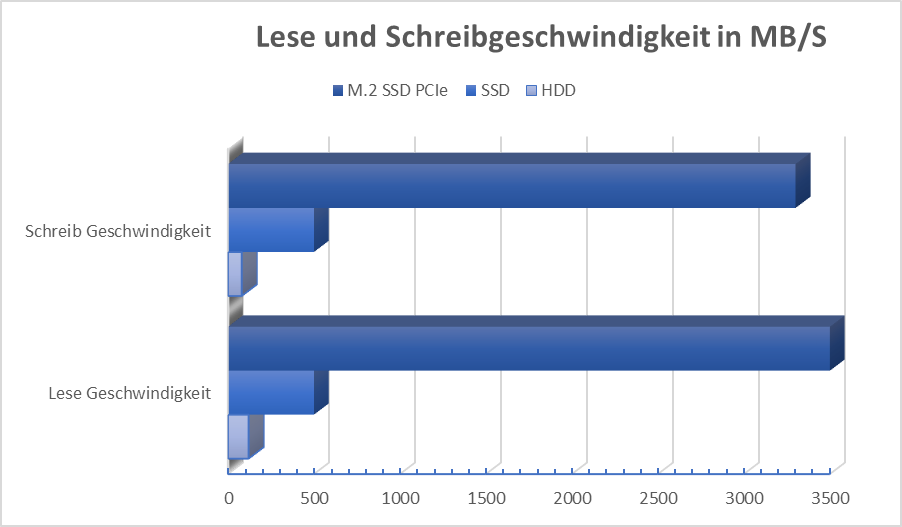
The big advantage of an SSD is its much shorter access time. Compared to an HDD, an SSD can be up to five times faster at reading and writing. For this reason, it is advisable to install the operating system on an SSD in order to have fast startup times and fast access times during use.
What Is an M.2 PCIe SSD Drive?
The M.2 SSD is the newest drive technology and, like the SSD, is also an electronic storage medium. One of the main differences is its size and connector. Normally, HDDs, SSHDs, and SSDs are connected to the motherboard via a SATA cable. An M.2 drive, however, is connected via a PCIe slot located directly on the motherboard. A similar connector is also used for graphics cards.
The shape of an M.2 SSD is rectangular. Normally they are 22 millimeters wide and 60 millimeters or 80 millimeters long; the length of the card can vary.
Which Drive Should Be Used in a Laptop or Tablet?
- Combination of 2 drives:
The optimal solution for a fast and long-lasting laptop is a combination of a small M.2 SSD, on which the operating system and a few important programs run, plus a second SSD drive that can be used for general data such as images, customer data, videos, and so on.
- A cloud-based solution:
This means an M.2 or SSD drive with not much storage space is installed, which makes it fairly inexpensive. Only the operating system and the most important programs are installed on the drive itself. All other data is available over the internet. There are various cloud approaches: one option is an external company with large data centers and many drives, where storage space can be rented for a set monthly fee. Alternatively, your company may have its own server room at its headquarters with several drives on which all the data is stored.
- The last option is the simplest and also the most cost-effective:
Only one drive is installed in the laptop or tablet (this can also be "just" an SSD) that offers plenty of storage space, so the operating system, data, and programs can all be stored on the same drive.
How Much Storage Should the Laptop Have?
As a rule of thumb, 250 songs/photos or 2 movies fit into 1 gigabyte.
This means 256 gigabytes of storage is enough for around 64,000 songs/photos or for 512 movies.
Comparison of HDD vs. SSD vs. M.2 SSD:
Storage Options in Our Rugged Laptops and Tablets
Our rugged laptops rely on a PCIe SSD that, according to the comparison table, is "up to 4x faster" than a conventional hard drive, with a capacity of 256 GB to 1 TB, depending on the model. For the rugged tablets, the storage (SSD/NVMe) depends on the configuration; the Durabook R8, for example, comes from the factory with a 128 GB PCIe SSD and can optionally be upgraded to a 256 GB, 512 GB, or 1 TB PCIe SSD. Details on all models are provided in the Laptop Comparison Table and the Tablet Comparison Table.
For the laptops, SSD OPAL 2.0 encryption is additionally available as an option – according to the comparison table, this feature is not available on the tablets. For more on the storage types HDD, SSHD, SSD, and M.2 SSD, see our in-depth article What Is a Hard Drive? Structure, Types, Differences.