Anyone running rugged laptops and tablets in shift work knows the problem: the battery is about to run out, but the device must not simply shut down. An ongoing data capture, an open connection, or an active scan must not be interrupted. This is exactly what hot-swap is for: swapping the battery while the device keeps running. This article explains what hot-swap technically means, how the swap works via a buffer battery, why it can be critical in shift work, how a fixed built-in battery differs from it, and what to look out for when it comes to chargers and spare batteries.
What does hot-swap mean for rugged laptops and tablets?
In general, hot-swap refers to the exchange and exchangeability of system components and modules while the system continues to run. In the context of rugged laptops and tablets, this specifically means swapping the battery during operation: the main battery is removed and replaced with a charged battery without the device having to be shut down, put into standby, or connected to an external power source. On the RobustBook website, this process is therefore consistently referred to as "battery swap during operation (hot-swap battery)". Both terms describe the same process.
This principle is implemented across several devices in the range, though to varying degrees: for the Durabook R8, the product overview states directly "battery life depends on usage & battery options (hot-swap/power possible)", while for the Durabook U11I, the auxiliary battery with hot-swap option is explicitly described as an option for "very long shifts and maximum availability". The same concept also appears outside the Durabook range: several Getac devices in the RobustBook range, such as the Getac K120, the Getac F110 G7, and the Getac A140, come standard with two hot-swap-capable batteries, so the swap can be done without stopping the system across an entire shift.
How does the swap during operation work technically? The buffer battery principle
So that a device does not immediately lose power when the main battery is removed, it needs a second, smaller power source that bridges exactly this gap. In the equipment list of the Durabook R10, this component appears under the name "bridge battery (buffer battery)" as its own, selectable integration option. The buffer battery powers the system for the short period of the swap, so that the operating system, open applications, and active connections keep running while the empty main battery is removed and a charged one is inserted.
How long this window is can be seen in the laptop comparison table: there, the row "bridge battery (5-minute swap time)" is listed as optional equipment for the models Durabook S15, S14I and Z14I. The swap time the buffer battery can bridge is therefore around 5 minutes. The same concept also appears on the Getac UX10, described there as an "optional bridge battery for hot-swap (battery swap during operation)", in addition to the choice between a standard and a high-performance battery.
No buffer battery, no hot-swap
If no buffer battery is fitted or configured, removing the main battery inevitably cuts the power supply. The device switches off as soon as the battery is pulled. That is why "bridge battery" and "battery swap during operation" are consistently listed in RobustBook's comparison tables as two separate but related equipment features: only if the buffer battery is present can the main battery actually be swapped without the system losing power.
Fixed built-in battery versus swappable battery: the difference in practice
Not every device in the range is designed for a battery swap during operation. The Durabook S15AB, for example, works with a fixed, built-in "high-capacity lithium-ion battery" with a runtime of up to 13 hours. In the laptop comparison table, this model consistently has no second battery, no bridge battery, and no battery swap during operation listed. This means: once the S15AB's battery runs out after 13 hours, the device must be connected to a power source to recharge. Swapping the battery during operation is not provided for on this model.
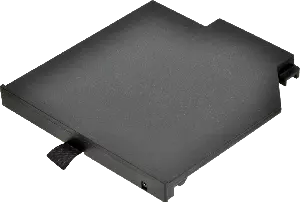
On the Durabook S15, S14I and Z14I models, on the other hand, battery swap during operation is available as an option. In addition, the S14I and Z14I can be configured with a second battery in the drive bay, which, according to the accessory comparison table, extends usage time by up to 10 hours. The second battery is removed and inserted via a strap and a slide switch for locking and unlocking. However, there is a limitation to keep in mind: each of these laptops can only accommodate one of three components in the drive bay at a time, a DVD drive, a second hard drive, or a second battery. Anyone opting for a second battery therefore forgoes the optical drive or the second storage drive in that same bay.
For the tablets, the tablet comparison table shows a similar picture: for the Durabook R11L and R11, bridge battery and battery swap during operation are not available; for the Durabook U11I and Durabook R8, on the other hand, they are optional. For the Durabook R10, the bridge battery is possible in principle, but "not included in the base configuration". It must therefore be specifically ordered.
Why is hot-swap critical in shift work?
In environments with continuous multi-shift operation, such as a warehouse, order picking, or the handover between two shifts, every minute a device is not ready for use counts. The logistics industry page names exactly this scenario as a core requirement: "batteries & chargers for 2-3 shifts" and "docking + accessories for fleet & shift work" are among the central equipment points there, which RobustBook uses to put together a rugged setup matched to the respective workflow, including barcode readers, vehicle or office docks, LTE/GPS, and batteries and chargers for shift work.
The reason lies in the process itself: without hot-swap, a device with a dead battery must either be plugged into a power supply or shut down before the battery can be swapped. In both cases, the device is out of action for several minutes to hours. With a buffer battery, on the other hand, the empty main battery can be swapped for a charged one within the bridged window of around 5 minutes, while the operating system and running applications keep working. On the Getac devices with a dual-battery system already mentioned, this effect is even made permanently usable: on the Getac F110 G7, two hot-swap-capable batteries, according to the product page, enable "a battery swap during operation, for unlimited runtime without a system stop"; on the Getac K120, two hot-swap-capable batteries are meant to ensure users "never run out of power, even during long shifts".
This feature is also relevant outside of logistics. On the industry pages for construction sites, industry, military, public safety, and forestry and agriculture, "technology for battery swap during operation (hot-swap battery)" is each listed as an optional accessory feature, an indication that continuous availability across an entire shift is considered a requirement across industries, not just in the warehouse.
Second battery, high-capacity battery, and spare batteries: what to look out for
Anyone configuring a device for long shifts or continuous operation generally has several battery options to choose from, which can be sensibly combined or deliberately excluded:
- Second battery (dual battery): Configurable as an upgrade in the drive bay on the S14I and Z14I, extending usage time by up to 10 hours, documented as 10 hours of additional runtime for the second battery of the Durabook S14I and 9 hours for the Durabook Z14I, according to the laptop comparison table.
- Extended high-capacity battery: Selectable as an upgrade from the standard battery on the Durabook R10, R11 and R11L, an alternative to the second battery, in which the capacity of the single installed battery is increased instead of adding a second one.
- Spare battery: Orderable as a separate accessory for almost every model: for example as a "replacement battery" for the Durabook S14I or as a "replacement extended high-capacity battery" for the Durabook R10 and R11. A pre-charged spare battery is the precondition for a hot-swap change to bring any benefit at all.
- Large battery for tablets: Listed as its own option in the accessory comparison table for tablets, allowing operating time to be increased to up to 24 hours.
- Extended battery warranty: Bookable for several Durabook models as a separate, multi-tier warranty extension (2 to 5 years) on the battery, for the R10 and R11, separated for the standard main battery and for the combination of the main and high-capacity battery.
These options are deliberately laid out as separate building blocks, because the actual need differs depending on the use case: anyone who rarely swaps but wants to last a long time benefits more from the high-capacity battery. Anyone working across several shifts with fixed handover times, on the other hand, benefits more from a second or multiple spare batteries combined with hot-swap.
Chargers for multiple batteries
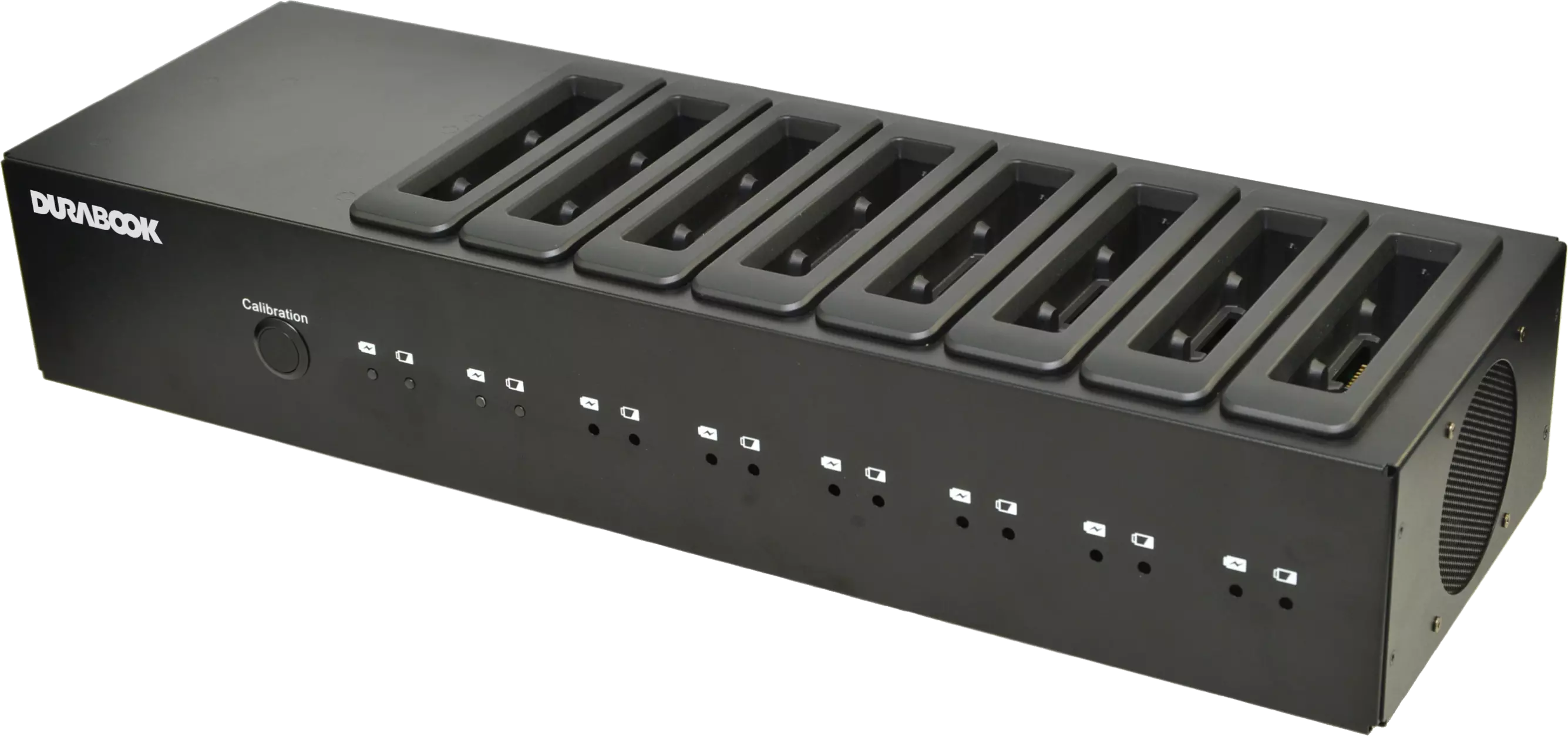
A hot-swap concept only works reliably if a charged spare battery is actually on hand at the moment of the swap. That is why RobustBook offers its own battery chargers as accessories for several Durabook laptops: a "battery charger - 2 bays", according to the product description, charges up to 2 batteries at the same time, while a "battery charger - 8 bays" charges up to 8 batteries at the same time. Both variants are listed as accessories for, among others, the Durabook S14I, Z14I, S15AB, R10, and R11. A charging station for 2 batteries is also available for tablets.
For shift work, this results in a simple but effective principle: batteries are not recharged in the device itself, but centrally, in a separate charging station, while the devices keep running. This is exactly what the logistics industry page addresses with "batteries & chargers for 2-3 shifts": a sufficiently large pool of batteries plus a multi-bay charger with 2 or 8 charging slots fully decouples recharging from the actual use of the devices. For teams with several devices per shift, the 8-bay charger is generally the more practical choice, while a single device or a smaller team is often well served by the 2-bay charger.
Which battery concept suits your use case?
For use in multi-shift operations, where a device should ideally never stand idle, models with an optional buffer battery and hot-swap function are the more suitable choice. Among the laptops, that is the Durabook S15, S14I and Z14I, and among the tablets, the Durabook U11I and R8. Combined with a second battery or spare batteries and a multi-bay charger for 2 or 8 batteries, this makes it possible to organize continuous operation across several shifts without the device being tied to a fixed power source for recharging.
If, on the other hand, the priority is the longest possible continuous runtime in a single stretch and a swap during operation is not required, a device with a fixed, built-in high-capacity battery, such as the Durabook S15AB, can be the simpler solution, with fewer moving parts and no need for accessories such as spare batteries or charging stations. A complete comparison of all battery features by model is provided by the laptop comparison table and the tablet comparison table.
If you have questions about which battery and charging concept fits your shift model, the RobustBook team will be happy to help you find the right configuration.