Which display diagonal makes sense for which purpose is already answered in detail by the article Display Sizes for Laptops and Tablets and Their Application Areas. This article takes a different approach: it presents diagonal and resolution not separately but together, as pixel density, and adds a figure that is often underestimated when choosing a device for mobile use: weight in relation to screen diagonal. Both metrics can be derived directly from the technical data of the RobustBook models and give a more concrete answer to the question of how sharp an image actually appears and how heavy a device actually becomes at a given display size.
Why Diagonal and Resolution Must Be Considered Together
Two displays with the same resolution do not look equally sharp if their diagonals differ. Full HD (1920 x 1080 pixels) on a 15.6-inch notebook appears noticeably coarser than the same resolution on an 11.6-inch tablet, because the same number of pixels is spread over a smaller area. This is relevant for mobile use because resolution figures alone: "Full HD," "HD," "WUXGA" say nothing about how finely text, icons, or technical drawings are actually rendered. Only the combination of resolution and diagonal, expressed as pixel density, provides this information. Anyone who also wants to know how bright a display needs to be in sunlight and what role anti-glare coating plays can find that in the article Sunlight-Readable Displays: Nits, Anti-Glare Coating, Polarizing Filters. This article deliberately focuses on size, resolution, and weight.
Which Resolutions Occur in the RobustBook Range
The range includes four different resolution classes, spread across diagonals from 6.67 to 15.6 inches:
- HD (1280 x 800 pixels): The Durabook R8 with an 8.0-inch display is the only HD resolution in the tablet range.
- Full HD (1920 x 1080 pixels): The most commonly used resolution, on all four Durabook laptops S15, S14I, Z14I, and S15AB (15.6 or 14.0 inches), on the 11.6-inch tablets R11L, R11, and U11I, and on the 13.3-inch notebook Fieldbook RC300.
- WUXGA (1920 x 1200 pixels): On the 10.1-inch tablet Durabook R10 as well as on the 10.1-inch tablets Getac UX10 and Getac ZX10 G2.
- HD+ / Full HD+ (2400 x 1080 pixels): On the 6.67-inch display of the rugged 5G handheld Archos X67, the smallest diagonal in the range.
It is notable that the same resolution, Full HD, for example, is used across a range from 11.6 to 15.6 inches. On paper the resolution is identical, but the actual image sharpness differs considerably, as the following section shows. The resolution also says nothing about whether a display is touch-capable: according to the Comparison Table Laptops, the touchscreen is not available on the Durabook S15, is optional on the S14I, and is standard on the Z14I, despite identical or similar Full HD resolution. Resolution, touch capability, and diagonal are therefore three independent properties that must be checked separately when choosing a device.
Pixel Density: What a Resolution Means on Displays of Different Sizes
Pixel density (given in ppi, "pixels per inch") is calculated from the diagonal in pixels divided by the diagonal in inches. The diagonal in pixels results from the square root of the sum of the squared horizontal and vertical pixel counts. Based on the diagonals and resolutions named above, as documented in the comparison tables and product pages, this calculation can be carried out for each model. The following overview shows the result, rounded to whole ppi:
- Archos X67 (6.67 inches, 2400 x 1080): approximately 395 ppi
- Durabook R8 (8.0 inches, 1280 x 800): approximately 189 ppi
- Getac ZX10 G2 / Getac UX10 / Durabook R10 (10.1 inches, 1920 x 1200): approximately 224 ppi
- Durabook R11L / R11 / U11I (11.6 inches, 1920 x 1080): approximately 190 ppi
- Fieldbook RC300 (13.3 inches, 1920 x 1080): approximately 166 ppi
- Durabook S14I / Z14I (14.0 inches, 1920 x 1080): approximately 157 ppi
- Durabook S15 / S15AB / Getac X600 (15.6 inches, 1920 x 1080): approximately 141 ppi
The pattern is clear: within the same Full HD resolution, pixel density drops from around 190 ppi on the 11.6-inch tablets to around 141 ppi on the 15.6-inch notebooks. In practical terms, for mobile use this means: a smaller display with the same resolution renders text and fine lines more sharply but also displays controls smaller, unless the Windows scaling is adjusted accordingly. Conversely, a larger Full HD display appears softer at the same viewing distance but offers more area for windows arranged side by side. The 10.1-inch WUXGA tablets reach the highest pixel density among the tablets and notebooks in the range at around 224 ppi, with similar usability to an 11.6-inch Full HD tablet but sharper rendering. The Archos X67, as a compact 5G handheld, is noticeably higher still at around 395 ppi, which is typical for a device of this size class.
Screen Diagonal and Weight: What This Means for Mobile Use
For employees who have to carry a device through an entire shift or operate it with one hand, weight is just as decisive as diagonal, and the two figures do not stand in a fixed relationship to each other. The following figures come from the comparison table in each case, or, where the comparison table does not yet list a value, from the respective product page:
- Archos X67 (6.67 inches): 380 g
- Getac ZX10 G2 (10.1 inches): 906 g
- Fieldbook RC300 (13.3 inches): 2.1 kg
- Durabook S14I (14.0 inches): 2.3 kg
- Durabook Z14I (14.0 inches): 3.6 kg
- Durabook S15 / S15AB (15.6 inches): 2.6 kg
- Getac X600 (15.6 inches): approx. 4.41 kg, depending on configuration
Two comparisons within this list show that diagonal alone says little about weight: the Durabook S14I and the Durabook Z14I both have a 14.0-inch display, but the Z14I weighs 3.6 kg, a good 1.3 kg more than the S14I at 2.3 kg. The difference lies in the more rugged housing of the Z14I, designed for higher drop-protection values. At 15.6 inches, the Durabook S15 and S15AB, each at 2.6 kg, sit clearly below the Getac X600 at approximately 4.41 kg, which is designed as a more powerful model with more computing power. In practice this means: anyone who chooses a device by diagonal alone does not yet know its weight. Both figures need to be checked together, especially when the device is carried over a longer period rather than used only at a fixed workstation.
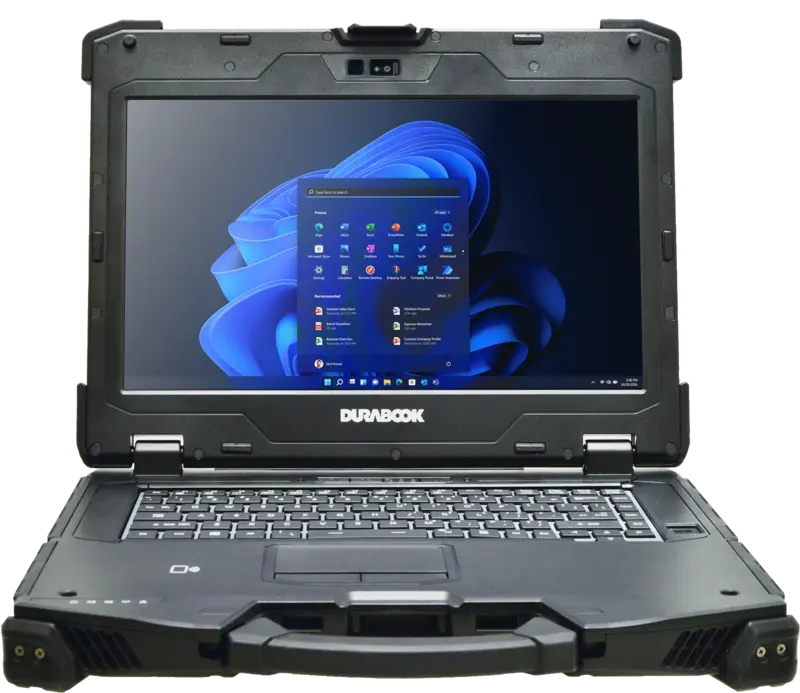
Size Classes for Mobile Use: An Overview
From diagonal, resolution, pixel density, and weight, three broad size classes for mobile use can be derived within the RobustBook range:
Handheld Class (up to 10.1 inches)
The Archos X67 (6.67 inches, 380 g), the Durabook R8 (8.0 inches), and the 10.1-inch tablets Durabook R10, Getac UX10, and Getac ZX10 G2 (906 g for the ZX10 G2) are designed for one-handed operation and scanning workflows. According to its product page, the R8 is explicitly intended for handheld workflows. This class combines low weight with high pixel density (189 to 395 ppi) but offers the smallest display area in the range.
Vehicle and Field Tablet Class (11.6 inches)
According to the Comparison Table Tablets, the Durabook tablets R11L, R11, and U11I with an 11.6-inch Full HD display are designed for vehicle use and field work: the R11L as an entry-level model for standard processes, the R11 as an all-rounder for vehicle and field, and the U11I for maximum outdoor and security options. Industries such as logistics or construction typically rely on this display size when a device is used both mounted in a vehicle and handheld.
Notebook Class (13.3 to 15.6 inches)
The Fieldbook RC300 (13.3 inches, 2.1 kg), the Durabook S14I and Z14I (14.0 inches), as well as the Durabook S15, S15AB, and Getac X600 (15.6 inches) form the largest and also the heaviest class in the range, with the lowest pixel density (141 to 166 ppi) but the largest display area at the same time. Anyone working with CAD models or several windows side by side will find detailed requirements on this in the article CAD on a Notebook: Requirements for Graphics, Memory, and Display. For industries such as industry or workshops, where a device is used mainly at a fixed or semi-fixed workstation and a larger display area outweighs low weight, this class is generally the more suitable choice compared to a handheld or vehicle tablet.
Within these three classes, the following applies: the smaller the diagonal at the same or similar resolution, the higher the pixel density and the tendentially lower the weight, but as the comparison between the Durabook S14I and Z14I, and between the Durabook S15/S15AB and Getac X600 shows, the ruggedness and performance design of the respective housing additionally determines the actual weight within a given diagonal.
Frequently Asked Questions
Is Higher Pixel Density Automatically Better?
Not across the board. A high pixel density means sharper rendering of text and fine lines but also makes controls smaller without adjusted scaling. For scanning and handheld workflows with short viewing distances, a high pixel density is usually an advantage, while for devices operated with gloves, the physical size of the control areas tends to matter more.
Why Does Weight Differ at the Same Display Size?
Because weight does not depend on the display alone, but on the entire housing, the ruggedness design, the battery, and the installed hardware. This is shown by the comparison between the Durabook S14I (2.3 kg) and Z14I (3.6 kg) with an identical 14.0-inch diagonal.
Which Resolution Is Most Widespread in the RobustBook Range?
Full HD (1920 x 1080 pixels). It is used on all four Durabook laptops, on three of the five Durabook tablets, and on the Fieldbook RC300.
Which Device Has the Highest Pixel Density in the Range?
The Archos X67 at around 395 ppi, followed by the 10.1-inch WUXGA tablets Durabook R10, Getac UX10, and Getac ZX10 G2 at around 224 ppi. Both calculations are based on the diagonals and resolutions listed in the comparison tables and product pages.
What Matters Beyond Diagonal When Choosing a Display
Considering diagonal and resolution separately only answers part of the question of the right display for mobile use. Only pixel density shows how sharp an image actually appears at a given display size, and only weight in relation to diagonal shows how well a device can be carried through a shift. In the RobustBook range, the span reaches from around 141 ppi on 15.6-inch notebooks to around 395 ppi on the 6.67-inch handheld, and from 380 g for the lightest to almost 4.5 kg for the largest model. Anyone looking for the right display size by application area will find the corresponding classification in the article Display Sizes for Laptops and Tablets and Their Application Areas; anyone who also wants to check readability in sunlight can find that in the article Sunlight-Readable Displays: Nits, Anti-Glare Coating, Polarizing Filters.
For a recommendation on which diagonal, resolution, and weight suit your specific application, the RobustBook team offers free, no-obligation advice.