Anyone procuring a rugged notebook or tablet for government agencies, emergency services, or industry will almost always encounter two terms: smartcard reader and TPM. Both regularly appear together in the security specifications of rugged devices, but they perform different tasks. This article explains what TPM and smartcard stand for, how logging in with a card differs from a password or fingerprint, why many tenders in the public sector and industry specifically require this combination, how drive encryption and TPM work together, and what happens if the device is lost. An overview of the other common security mechanisms found in rugged laptops – including SSD encryption per OPAL 2.0, the Kensington lock, NIST BIOS compliance, and fingerprint scanners – is provided in the article Ideal Laptop Protection: 5 Security Features and Protection Mechanisms Compared. This article focuses on the two building blocks most frequently required in field deployments with access control.
What Is a TPM Chip?
TPM stands for “Trusted Platform Module” and refers to a small physical chip module permanently mounted on the mainboard that is an additional security mechanism alongside the actual processor. The chip handles several tasks at once: it is responsible for drive encryption, protection against firmware manipulation by BIOS rootkits, biometric authentication, and transmitting the system state when accessing cloud services. TPM is therefore not a single login method, but rather a kind of secured vault on the board where cryptographic keys are stored and processed without ever leaving the chip module in plain text.
The current version, TPM 2.0, is now standard on virtually all rugged devices in the RobustBook range. In the laptop comparison table, TPM 2.0 is listed as its own row and marked with a checkmark for all compared models, as is the case in the tablet comparison table. TPM 2.0 is also a fixed part of the security equipment on Getac devices, for example on the Getac X500, the Getac K120, and the Getac ATEX EX80 designed for Ex zones. On the Durabook S14I, the combination of smartcard reader and TPM is even explicitly listed as a joint security feature.
What Is a Smartcard Reader and What Is It Used For?
A smartcard reader reads a physical chip card – such as an employee ID, a signature card, or a health insurance card – and passes the data or certificates stored on it to the operating system or a specialized application. Unlike pure password protection, logging in this way requires possession of a physical object, not just knowledge of a character string.
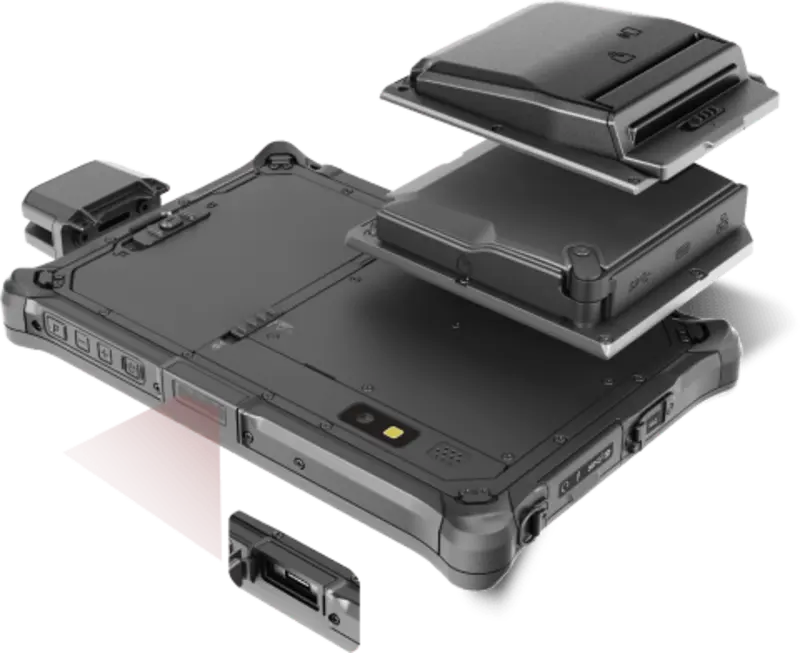
In the RobustBook range, the smartcard reader is available on several models as an expansion module or factory option. On the Durabook R8, an expansion module with a smartcard reader can be selected – either as a pure card reader, in combination with LF/HF RFID (NFC), with UHF RFID (NFC), or together with RS-232/RJ-45 and USB3.2 ports. The same expansion option is also available on the Durabook R11 and the Durabook R11L. On the Durabook S14I, the smartcard reader can be ordered as a factory option, optionally also as a rear-mounted variant, and is explicitly listed there together with TPM as a security feature.
Several Getac models also list the smartcard reader in their security equipment: the Getac X500 mentions TPM 2.0, Kensington lock, smart card reader, and fingerprint scanner in one line. On the Getac B360 G3, a smartcard reader is part of the standard equipment; on the Getac K120 and the Getac UX10, the card reader is selectable as an option alongside a fingerprint reader. The Getac V110 G3 and the Getac X600 also list TPM 2.0 together with an optional fingerprint reader or smartcard reader. In the comparison tables for laptops and tablets, the smartcard reader is listed as its own row – standard on some of the compared models, optional on others.
Two-Factor Login with a Smartcard Compared to Password and Fingerprint
When logging in to a device, three basic types of proof can be distinguished: something a person knows (a password or a PIN), something a person possesses (a chip card or a token), and something a person is (a biometric feature such as a fingerprint). A password alone covers only the knowledge factor and can be guessed, intercepted, or passed on. A fingerprint scanner offers high convenience because no code needs to be remembered, but as noted in the article on laptop security features, it also has weaknesses: reading errors occur occasionally, and fingerprints can generally be replicated. A fingerprint scanner alone therefore does not offer comprehensive protection in professional use.
A smartcard, by contrast, addresses the possession factor: without the physical card, no one can access the account, even if a password were known. If the card is additionally combined with a PIN or a biometric feature, a genuine two-factor login emerges from possession and knowledge, or possession and biometrics. This exact combination is found in several devices in the range: the Getac K120 combines TPM 2.0, Windows Hello facial recognition, and optional smartcard or fingerprint readers; the Getac UX10 relies on Windows Hello facial recognition, TPM 2.0, and an optional fingerprint scanner or smartcard reader. A password alone remains part of the login process on all these devices – the card or biometric feature is added as a second, independent factor, not as a replacement.
Why Government Agencies, Emergency Services, and Industry Rely on Smartcard and TPM
In the public sector and among emergency services, the combination of smartcard and TPM is often not a free choice but a requirement. The page Military Tablets and Military Laptops summarizes this briefly: clear protection classes depending on the deployment, optional security features such as smart card or RFID depending on the model, and defined configurations. The page Public Safety also names the card reader as a concrete use case in data capture: reading health insurance cards via the optional card reader, for example for police, fire departments, or emergency medical services in the field.
The reason lies in the nature of these deployments: devices are used in vehicles, at the deployment site, or across changing shifts, often under time pressure. A password alone cannot reliably control who is currently logging in – a chip card, by contrast, is tied to a person and can be easily removed at shift change, immediately locking the device. Similar considerations apply in industry, for example in explosion-hazard areas: the Getac ATEX EX80 for Ex zones lists TPM 2.0 together with an integrated HF RFID reader as security features, so that access control and zone certification come together in the same device.
Drive Encryption in Combination with TPM
According to its own security specifications, TPM is responsible, among other things, for drive encryption. Specifically, this means: the key used to encrypt the data on the drive is not simply stored on the hard drive itself or in the operating system, but is kept in the protected memory area of the TPM chip. An attacker who physically removes the hard drive and installs it in another device therefore cannot readily access the key – it is bound to the respective TPM module and thus to the original device.
For the actual encryption of the SSD, many rugged devices additionally use the OPAL 2.0 standard, which offloads the encryption workload onto the SSD itself instead of the CPU. How OPAL 2.0 works in detail and where the limits of software-based encryption lie is described in detail in the article Ideal Laptop Protection. In combination with TPM, this results in multi-layered protection: TPM secures key management and firmware integrity at system startup, while SSD encryption secures the actual data on the drive. The smartcard reader adds a third layer by determining who gets access to the decrypted system in the first place.
What Happens If a Device Is Lost?
If a rugged notebook or tablet is lost or stolen in the field, the mechanisms described above work together. Without the matching smartcard and the associated PIN or biometric feature, no one can access the user account – unlike a password, the possession factor cannot simply be guessed or copied down. The data stored on the drive remains additionally protected by encryption, whose key is bound to the TPM chip. If an attempt is made to manipulate the firmware to bypass the protection mechanisms, the protection against firmware manipulation by BIOS rootkits anchored in the TPM takes effect.
In addition, a Kensington lock can make unattended theft more difficult in the first place – details on this mechanism, its advantages, and its limits can also be found in the article Ideal Laptop Protection. For organizations that operate devices with an official chip card, device loss in practice mainly means organizational effort: the lost card must be blocked and replaced, while the device itself, thanks to TPM-bound encryption, allows no access to the stored data without the card.
Which Models Offer a Smartcard Reader and TPM?
TPM 2.0 is consistently present across the rugged devices in the range, as shown by the laptop comparison table and the tablet comparison table. A smartcard reader as an expansion module or factory option is offered on, among others, the Durabook R8, the Durabook R11, the Durabook R11L, and the Durabook S14I. At Getac, among others, the Getac X500 and the Getac K120 list a smartcard reader in their security equipment; for use in Ex zones, the Getac ATEX EX80 with TPM 2.0 and RFID reader is an option. Which model fits in detail depends, besides access control, on the deployment environment, display size, and the remaining ports – a complete overview of all technical data can be found in the two comparison tables.
How TPM and Smartcard Readers Work Together
TPM and smartcard readers solve two different tasks that work together in the field: the TPM chip manages keys, secures the firmware, and is involved in drive encryption, while the smartcard reader provides the possession factor for a genuine two-factor login – a safeguard that neither a plain password nor a fingerprint scanner alone can offer. This is exactly why this combination is often a requirement rather than an optional extra for government agencies, emergency services, and parts of industry. For the specific model choice, the laptop comparison table and the tablet comparison table provide a complete overview of TPM and smartcard equipment per model, while the article Ideal Laptop Protection classifies the other security mechanisms such as OPAL 2.0, Kensington lock, NIST BIOS, and fingerprint scanner in detail.
If you have questions about the right access control for your deployment area, the RobustBook team is happy to help you choose the right model.