What the RS232 interface is in general is explained in the article The RS232 Interface: What Is It?. This article goes a step further: which rugged laptops and tablets actually have the interface, what types of connectors and cables exist, what to watch out for when troubleshooting, and which device suits which use case in the workshop or in industry?
When Is RS-232 Still Needed in Practice?
In car dealerships and auto repair shops, the RS232 interface still plays an important role, as it is one of the most widely used standards for serial ports and many diagnostic devices are accessed this way. In industry too, RS232 is one of the optional interfaces – alongside Bluetooth, LTE, GPS, and barcode readers – used to program and monitor machine controllers. Many machine controllers and industrial devices still use RS232 today because it offers a stable and simple way to transmit data and allows technicians to read out diagnostic data and load software updates directly onto machine controllers without relying on expensive specialized equipment.
Which RobustBook Devices Have an RS232 Interface?
Built In
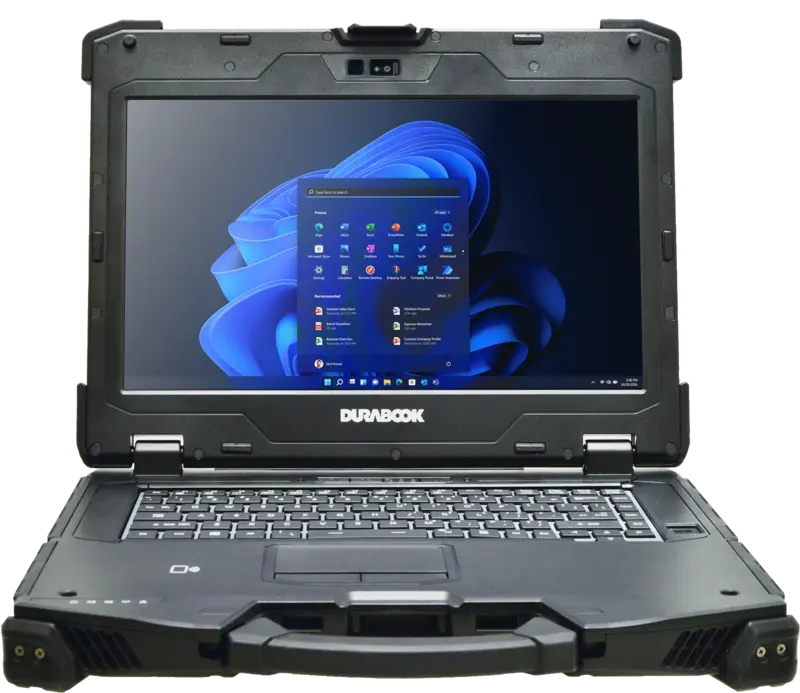
- Durabook Z14I – 2x RS232, factory-integrated.
- Durabook S15 – 1x RS232, factory-integrated.
- Durabook S14I – 1x RS232, plus a second RS232 port available as a factory media bay option.
Optional Retrofit
- Durabook R11 – optional via expansion module (RJ45 & RS232 & smart card combo reader).
- Durabook U11I – RS232 optional, mutually exclusive with USB 3.2 Type A.
- Durabook R8 – optional via expansion module (smart card reader with RS-232/RJ-45 & USB 3.2).
A detailed overview with all the details is provided on the Laptop With a Serial Port (RS-232) page.
DB9 and DB25: The Two Connector Types
The RS232 protocol is usually connected via a 9-pin serial interface (DB9), with male or female connectors. The older RS232C variant instead uses a 25-pin interface (DB25), while retaining the same functions as the 9-pin version. Regardless of whether the interface used is DB9 or DB25, in practice only three pins are needed to connect the peripheral devices – RobustBook devices generally use the 9-pin DB9 variant.
Null Modem Cable or Straight-Through Cable: Which One Is Needed?
Null Modem Cable
A null modem cable is used to establish serial communication between two devices that both act as Data Terminal Equipment (DTE) – for example, two laptops connected directly to each other without a modem in between. The Tx pin of one connector is connected to the Rx pin of the other and vice versa, so that the transmit and receive lines are crossed.
Straight-Through Cable
A straight-through cable, on the other hand, uses a one-to-one connection, in which data is transmitted from one pin of a device to the same pin of the other device. This cable is used when a DTE device (e.g. a laptop) is connected to a DCE device (e.g. a modem or a peripheral device addressed serially).
Which of the two cables is needed therefore depends on whether the two connected devices have the same role (both DTE) or different roles (DTE and DCE).
Troubleshooting RS-232 Connections
The most common source of error in serial connections is mixing up the null modem cable and the straight-through cable: if the wrong cable is used for the respective device combination, no data transmission occurs, or it occurs incorrectly, because the transmit and receive lines are not connected as required. A first step in troubleshooting is therefore to check which role the two connected devices play (DTE or DCE) and whether the correct cable is being used.
Another point is the connector type: if a device with a DB9 connector is connected to a device with a DB25 connector, a suitable adapter or corresponding cable is needed, since the pin assignment differs between the two connector variants. For RobustBook devices with an optional RS232 expansion module – such as the Durabook R11, U11I, or R8 – it is also worth checking whether the module is correctly inserted and whether the interface is mutually exclusive with another port such as USB 3.2 Type A, as is the case with the Durabook U11I.
How Far Can an RS232 Connection Reach?
The RS232 interface can guarantee reliable data transmission over a distance of up to around 20 meters. This is sufficient for most use cases in the workshop or at a machine controller, where the device and peripheral are in close proximity to each other. For greater distances, it should be checked in advance whether the planned cable length still falls within this range, as transmission quality can decrease with increasing distance.
RS232 Compared to More Modern Interfaces
Modern devices today mostly use USB, Ethernet, or Wi-Fi for serial communication. RS232 has nevertheless persisted in certain areas, partly because RS232 signals can be sent over greater distances and the interface offers comparatively good noise protection. Another reason is its extensive support by older software and systems: many legacy systems in workshops and in industry are based on RS232 communication, and the cost of a complete upgrade to USB or Ethernet can be considerable. For businesses that continue to work with such systems, a laptop with a factory-fitted or retrofittable RS232 port therefore often remains the more practical solution.
Built In or Retrofittable: What Suits Which Use Case?
Anyone who needs RS232 permanently and regularly, for example for the daily connection of diagnostic devices or machine controllers, is generally better served by a laptop that has the interface factory-integrated – at RobustBook these are the Durabook Z14I, S15, and S14I models. If RS232 is only needed occasionally, on the other hand, a tablet with an optional expansion module can be the more flexible choice, since the module can be used as needed without the interface having to be permanently built into the device in everyday use. For the optionally retrofittable models, it is also worth checking whether the interface is mutually exclusive with other ports, as is the case with the Durabook U11I and USB 3.2 Type A.
Checklist for RS-232 Troubleshooting
If an RS232 connection does not work as expected, it helps to go through the possible causes one by one:
- Check the cable type: Is a null modem cable being used when a straight-through cable is needed (or vice versa)? This is the most common source of error in serial connections.
- Clarify device roles: Are both connected devices DTE (then a null modem cable is needed), or one DTE and one DCE device (then a straight-through cable is needed)?
- Match the connector type: If a device with a DB9 connector is connected to a device with a DB25 connector, a suitable adapter is required, as the pin assignment is not identical.
- Check the expansion module: For tablets with an optional RS232 module, such as the Durabook R11, U11I, or R8, check whether the module is correctly inserted.
- Note mutual exclusivity: On the Durabook U11I, RS232 and USB 3.2 Type A are mutually exclusive – check whether both are accidentally needed at the same time.
- Check the cable length: Is the distance between the devices within the roughly 20 meters typically supported by RS232?
- Visually inspect the connector: Is the connector fully and firmly seated in the socket, and are the contacts visibly undamaged?
If the cause cannot be narrowed down with this checklist, RobustBook can help you choose the right cable, adapter, or expansion module for your device. Especially when switching from an older to a newer device, it is worth checking whether the new machine offers the same interface equipment as the previously used model, so that existing diagnostic devices or machine controllers can continue to be used without an additional adapter.
RS-232 in the Workshop and in Industry
For use in car dealerships and workshops, RobustBook offers rugged devices that allow older diagnostic devices to be connected via RS232 – an overview of this is provided on the Car Dealership page. In industry, RS232 is used primarily to connect machine controllers, see the Industry page. In both sectors, it is common for RS232 to continue being carried alongside more modern interfaces such as Bluetooth, LTE, GPS, or barcode readers, as one of several optional or built-in connection options, so that existing peripheral devices can continue to be used without conversion.
Frequently Asked Questions
Do I Always Need a Null Modem Cable for RS232?
No. A null modem cable is only needed when two devices with the same role (two DTE devices) are connected directly. When a DTE device is connected to a DCE device, a straight-through cable is used instead.
Which RobustBook Device Has Two RS232 Ports as Standard?
The Durabook Z14I is factory-equipped with 2x RS232.
Can RS232 Be Retrofitted on Tablets?
Yes, RS232 can be optionally retrofitted via an expansion module on the Durabook R11, Durabook U11I, and Durabook R8 models.
How Long Can an RS232 Cable Be at Most?
RS232 guarantees reliable data transmission over a distance of up to around 20 meters. For most applications in workshops and industry, where the laptop and peripheral device are close to each other, the actual cable length needed is well below that.
Why Do RobustBook Tablets Use an Expansion Module Instead of a Built-In Port?
On the Durabook R11, U11I, and R8 tablets, RS232 is available as an optional expansion module rather than being permanently built in at the factory. Anyone who needs the interface regularly should make sure to select the corresponding module when ordering; anyone who does not need it can do without the module.
Summary: The Key Terms
- DTE: Data Terminal Equipment, e.g. a laptop.
- DCE: Data Circuit-terminating Equipment, e.g. a modem or a peripheral device addressed serially.
- DB9 / DB25: the two common connector variants with 9 and 25 pins respectively.
- Null modem cable: crossed cable for connecting two DTE devices.
- Straight-through cable: one-to-one connection for connecting a DTE device to a DCE device.
What to Clarify Before Using RS-232
Anyone using RS-232 in practical operation should clarify three things: which connector type (DB9 or DB25) is needed, whether a null modem cable or a straight-through cable must be used, and which RobustBook device offers the interface built in or as an optional retrofit. An overview of all suitable models is provided on the Laptop With a Serial Port (RS-232) page.